24/7 IT Support in Irvine: How Continuous Monitoring Stops Downtime Before It Starts
🎙️ Dive Deeper with Our Podcast!
Summary
Business downtime costs Orange County companies an average of $5,600 per minute, yet most small and medium-sized businesses still rely on reactive “break-fix” IT support that only responds after problems occur. Modern 24/7 IT support in Irvine has evolved beyond traditional helpdesk services into proactive monitoring systems that identify and resolve issues before they impact operations. This comprehensive guide explores how continuous network monitoring, automated alert systems, and rapid-response protocols work together to eliminate costly downtime. Discover why forward-thinking businesses are replacing outdated reactive support models with always-on monitoring that protects productivity, revenue, and customer trust around the clock.
The Hidden Cost of Downtime: Why Every Minute Matters
When your business systems go offline, the financial impact extends far beyond the immediate crisis. Recent industry research reveals that unplanned downtime costs small and medium-sized businesses between $137,000 and $427,000 annually—figures that don’t account for damaged reputation, lost customer confidence, or diminished employee morale.
Consider a typical scenario: Your email server crashes at 2:00 PM on a Tuesday. Without 24/7 IT support monitoring your systems, the problem might not be discovered until an employee reports it thirty minutes later. Your helpdesk ticket gets logged, prioritized, and eventually assigned to a technician. By the time the issue is diagnosed and resolved, three to four hours have elapsed. During that window, your sales team couldn’t respond to leads, your customer service department couldn’t access support tickets, and your operations ground to a halt.
This reactive approach—waiting for problems to surface before addressing them—represents the old paradigm of business IT support. Companies throughout Irvine and Orange County are discovering that this model no longer aligns with modern business requirements where connectivity, data access, and system availability directly determine competitive advantage.
The financial mathematics are straightforward. If your business generates $1 million in annual revenue and operates on a standard business schedule, each hour of downtime potentially costs approximately $500. A four-hour email outage represents $2,000 in lost productivity and revenue. When you factor in the cumulative impact of multiple incidents throughout the year, the total cost becomes staggering.
Beyond direct financial losses, downtime erodes customer trust. In an era where consumers expect instant responses and seamless digital experiences, even brief service interruptions can drive customers toward competitors. A study by ITIC found that 98% of organizations report that a single hour of downtime costs them over $100,000, with 33% indicating that hourly downtime costs exceed $1 million.
The solution isn’t simply faster break-fix response times—it’s preventing problems from occurring in the first place through continuous monitoring and proactive intervention.
What Is Continuous IT Monitoring and How Does It Work?
Continuous monitoring represents a fundamental shift in how businesses approach IT infrastructure management. Rather than waiting for systems to fail and users to report problems, monitoring technology constantly watches every critical component of your IT environment, identifying anomalies, performance degradation, and potential failures before they impact operations.
Modern monitoring systems deployed by experienced IT support providers in Irvine operate on multiple layers simultaneously:
Infrastructure Monitoring: Specialized software agents track the health and performance of physical and virtual servers, network devices, storage systems, and backup infrastructure. These agents measure dozens of metrics including CPU utilization, memory consumption, disk space, network bandwidth, temperature sensors, and power supply status. When any metric approaches critical thresholds, the system generates alerts that enable technicians to intervene before failure occurs.
Application Monitoring: Beyond infrastructure hardware, monitoring extends into the software applications your business depends on daily. This includes email platforms, customer relationship management systems, accounting software, industry-specific applications, and cloud services. Application monitoring tracks response times, error rates, transaction volumes, and user experience metrics to ensure optimal performance.
Network Monitoring: Your network represents the digital highway connecting all business systems. Comprehensive monitoring examines bandwidth utilization, packet loss, latency, switch and router performance, firewall activity, and wireless access point status. Network monitoring also identifies unauthorized devices, unusual traffic patterns that might indicate security threats, and configuration changes that could create vulnerabilities.
Security Monitoring: Integrated security monitoring watches for indicators of compromise, suspicious login attempts, malware activity, unauthorized access attempts, and policy violations. This layer connects directly to your cybersecurity infrastructure, providing real-time visibility into potential threats.
Endpoint Monitoring: With employees working across offices, homes, and remote locations, endpoint monitoring tracks the health and security of laptops, desktops, mobile devices, and tablets. This includes patch status, antivirus updates, disk health, and compliance with security policies.
The real power of continuous monitoring emerges from intelligent correlation across these layers. When your monitoring system detects that a server’s disk space is filling rapidly, application response times are degrading, and backup jobs are failing, it doesn’t simply generate three separate alerts. Advanced monitoring platforms recognize these symptoms as interconnected indicators of a storage capacity issue and prioritize remediation before complete system failure occurs.
Automated response capabilities further enhance monitoring effectiveness. When predetermined conditions are met—for example, when memory utilization exceeds 90% for more than five minutes—the monitoring system can automatically execute corrective scripts, restart services, clear temporary files, or allocate additional resources from virtualized infrastructure. This automation resolves many common issues without requiring human intervention, often before users even notice a problem.
The Anatomy of a Modern 24/7 IT Support Infrastructure
Effective round-the-clock IT support requires more than just technicians working night shifts. The most sophisticated business IT helpdesk operations in Orange County integrate people, processes, and technology into seamless support ecosystems designed for rapid issue identification and resolution.
Network Operations Center (NOC): At the heart of continuous monitoring sits the NOC—a dedicated facility staffed by technical specialists who watch monitoring dashboards displaying real-time status information from all client systems. When alerts trigger, NOC personnel immediately begin triage, determining issue severity, business impact, and appropriate response. For many common problems, NOC teams resolve issues remotely before they ever impact end users.
Tiered Support Structure: Professional IT support organizations implement tiered support models that ensure issues reach technicians with appropriate expertise levels. Level 1 support handles password resets, basic troubleshooting, and common user questions. Level 2 support addresses more complex technical problems requiring deeper system knowledge. Level 3 support involves specialized engineers who handle infrastructure challenges, security incidents, and complex integrations. This tiered approach maximizes efficiency by matching problem complexity with technician expertise.
Escalation Protocols: Clear escalation procedures ensure that urgent issues receive immediate attention. When monitoring systems detect critical failures—such as complete server outages, security breaches, or widespread network failures—alerts escalate directly to senior engineers and client stakeholders. Escalation protocols define response time commitments, communication requirements, and decision-making authority for different incident types.
Remote Management Tools: Modern IT support relies heavily on remote access technology that allows technicians to securely connect to servers, workstations, network devices, and cloud platforms from anywhere. Remote management eliminates travel time, enables faster response, and allows support teams to assist users regardless of their physical location. Advanced remote tools provide full administrative control, system diagnostics, file transfer capabilities, and session recording for quality assurance.
Knowledge Management Systems: Comprehensive knowledge bases capture solutions to common problems, configuration standards, troubleshooting workflows, and best practices. When incidents occur, support technicians can quickly search knowledge systems to find proven solutions rather than troubleshooting from scratch. These systems continuously improve as new problems and solutions are documented, creating an ever-expanding repository of organizational IT intelligence.
Service Level Agreements (SLAs): Professional IT support providers document specific response and resolution time commitments through formal SLAs. These agreements typically define different response tiers based on incident severity. For example, a critical outage affecting all users might require initial response within 15 minutes and resolution within four hours, while a low-priority enhancement request might have a 48-hour response timeframe. SLAs create accountability and ensure clients understand what to expect from their support partnership.
Communication Channels: Users need multiple ways to request assistance and receive updates. Modern helpdesk platforms integrate phone support, email ticketing, web portals, chat systems, and mobile apps. This multi-channel approach ensures employees can reach support through their preferred method while maintaining centralized ticket management that prevents duplicate efforts or missed requests.
Asset Management Integration: Support effectiveness improves dramatically when technicians have instant access to complete hardware and software inventories, warranty information, license details, configuration history, and maintenance records. Integrated asset management systems provide this context, enabling faster diagnosis and ensuring compliance with licensing agreements and support contracts.
Proactive Monitoring vs. Reactive Support: A Real-World Comparison
Understanding the practical difference between proactive monitoring and reactive support becomes clearer through examining real-world scenarios that businesses face regularly.
Scenario 1: Hard Drive Failure
Reactive Approach: A server hard drive begins developing bad sectors—early indicators of impending failure. Without monitoring, these warnings go unnoticed. Eventually, the drive fails completely during business hours, causing immediate system unavailability. Users report problems. A technician investigates remotely, diagnoses hardware failure, and determines an on-site replacement is required. Parts are ordered with rush shipping. Two business days later, the drive arrives and is installed. Data restoration from backups begins, requiring additional hours. Total downtime: 48+ hours. Business impact: Severe disruption to operations, potential data loss, emergency hardware costs, overnight shipping fees.
Proactive Approach: Continuous monitoring detects SMART errors (Self-Monitoring, Analysis, and Reporting Technology alerts) indicating early drive degradation. An automated alert notifies the support team. A technician reviews the alert, confirms the issue, and schedules a drive replacement during off-hours that week. The replacement occurs at 8:00 PM when no users are affected. Data is migrated to the new drive, and the server is back online before the next business day begins. Total downtime: Zero. Business impact: None—employees never know a problem existed.
Scenario 2: Ransomware Attack
Reactive Approach: An employee clicks a malicious email attachment at 10:00 AM. Ransomware begins encrypting files on their computer and spreading across the network. The user notices files won’t open and reports the problem at 10:45 AM. By the time IT support identifies the attack and begins containment at 11:30 AM, hundreds of files are encrypted and multiple systems are compromised. Recovery requires restoring from backups, but the most recent backup is from the previous night, resulting in data loss. Some files must be reconstructed manually. Recovery takes three days. Business impact: Significant data loss, extended downtime, potential ransom payment consideration, damaged customer relationships, possible regulatory reporting requirements.
Proactive Approach: Security monitoring detects unusual file encryption activity at 10:05 AM—just five minutes after the initial infection. Automated response systems immediately isolate the affected workstation from the network, preventing spread. The security team investigates, confirms ransomware, and initiates incident response procedures. The compromised machine is wiped and rebuilt. Because the attack was contained to a single device before spreading, no data loss occurs beyond that workstation, which is recovered from the previous night’s backup. The user is operational again by 2:00 PM. Total impact: One partially lost work day for one employee. Business impact: Minimal—the attack was stopped before it could spread.
Scenario 3: Internet Connection Degradation
Reactive Approach: Your business’s internet connection begins experiencing intermittent packet loss due to a failing cable connection. Users notice occasional slowness and dropped VoIP calls but attribute it to normal network congestion. The problem worsens over several weeks. Eventually, someone reports the issue to IT support. Investigation takes time because the problem is intermittent. After multiple diagnostic sessions, the ISP is contacted, schedules a technician visit, and eventually identifies and repairs the cable fault. Timeline: Three weeks of degraded performance before resolution. Business impact: Reduced productivity, frustrated employees, dropped customer calls, poor video conference quality.
Proactive Approach: Network monitoring detects increasing packet loss and latency patterns. After 48 hours of data collection, the monitoring system identifies the issue as an ISP connection problem rather than internal network issues. The IT support team contacts the ISP with detailed diagnostic data demonstrating the fault. The ISP prioritizes the ticket based on concrete evidence and dispatches a technician within 24 hours. The cable issue is identified and repaired. Timeline: Problem resolved within three days of initial detection. Business impact: Minimal—most users never noticed performance issues.
These comparisons illustrate a fundamental truth: proactive monitoring doesn’t just respond faster—it prevents problems from becoming emergencies in the first place. The cost savings from avoiding just one major incident often exceeds the annual investment in comprehensive monitoring and support services.
Key Technologies Behind Continuous Monitoring
Modern IT support in Irvine relies on sophisticated technology platforms that work together to provide comprehensive visibility and control. Understanding these technologies helps business leaders make informed decisions about their IT infrastructure investments.
Remote Monitoring and Management (RMM) Platforms: RMM software serves as the central nervous system of continuous monitoring operations. These platforms deploy lightweight software agents to servers, workstations, and network devices, collecting telemetry data that flows back to centralized management consoles. RMM platforms typically monitor hundreds of system metrics, execute remote commands, deploy software updates, run maintenance scripts, and generate automated alerts based on configurable thresholds. Leading RMM solutions integrate with professional service automation (PSA) platforms to automatically create support tickets when issues are detected.
Network Management Systems (NMS): While RMM platforms focus on endpoints and servers, specialized NMS tools provide deep visibility into network infrastructure. These systems use SNMP (Simple Network Management Protocol), NetFlow analysis, and packet inspection to monitor switches, routers, firewalls, wireless access points, and load balancers. NMS platforms generate network topology maps, track bandwidth utilization by application or user, identify bottlenecks, and alert on connectivity failures or performance degradation.
Security Information and Event Management (SIEM): SIEM platforms aggregate security-related data from firewalls, intrusion detection systems, antivirus software, authentication systems, and application logs. Using correlation rules and behavioral analysis, SIEM solutions identify security incidents that might be missed when examining individual log sources in isolation. For example, a SIEM might correlate failed login attempts across multiple systems to identify a potential account compromise attempt that wouldn’t be obvious from examining any single system’s logs.
Backup Verification Systems: Backup completion is only the first step in data protection. Comprehensive monitoring includes automated backup verification that tests backup integrity, confirms all critical data was captured, monitors backup storage capacity, and alerts on job failures or increasing backup duration. Advanced systems perform automated restore testing to ensure backups are actually recoverable when needed.
Application Performance Monitoring (APM): For businesses dependent on custom applications or industry-specific software, APM tools provide detailed insight into application health and performance. These systems track transaction response times, identify bottlenecks in code execution, monitor database query performance, and alert on application errors or crashes. APM helps distinguish between infrastructure problems and application bugs, accelerating troubleshooting.
Synthetic Transaction Monitoring: This technology simulates user interactions with web applications, email systems, and other services to verify availability and performance from the end-user perspective. Synthetic monitors might periodically send test emails, log into web portals, execute database queries, or perform common transactions. If these test transactions fail or respond slowly, alerts trigger even if backend monitoring shows all systems running normally.
Cloud Monitoring Integrations: As businesses adopt cloud services like Microsoft 365, Azure, AWS, and specialized SaaS applications, monitoring must extend into these platforms. Cloud monitoring integrations track service availability, performance metrics, licensing utilization, security configurations, and compliance status. These integrations alert when cloud service outages occur, license limits are approaching, or security settings deviate from organizational policies.
Mobile Device Management (MDM): With remote work and mobile computing becoming standard, MDM platforms monitor the health, security, and compliance of smartphones and tablets. MDM solutions track device location (when permitted), enforce security policies, deploy applications, remotely wipe lost or stolen devices, and ensure devices remain patched and protected.
Artificial Intelligence and Machine Learning: Advanced monitoring platforms now incorporate AI and machine learning to identify patterns that human analysts might miss. These systems establish baseline normal behavior for each monitored device and application, then use statistical analysis to detect anomalies that could indicate problems. Machine learning models improve over time, becoming more accurate at distinguishing genuine issues from normal operational variance.
The integration of these technologies creates comprehensive monitoring ecosystems that provide complete visibility across modern IT environments. When properly configured and managed by experienced IT support teams, these platforms transform from simple alerting tools into predictive systems that enable truly proactive infrastructure management.
Common IT Issues That 24/7 Monitoring Prevents
Business leaders often wonder what specific problems continuous monitoring actually prevents. Based on real-world experience supporting businesses throughout Orange County, here are the most common issues that proactive monitoring identifies and resolves before they impact operations:
Capacity Issues: Storage space, memory, and processing capacity don’t suddenly disappear—they gradually fill over weeks or months. Monitoring tracks capacity utilization trends and predicts when systems will reach critical thresholds, enabling IT support teams to add capacity during planned maintenance windows rather than during emergency situations.
Certificate Expirations: SSL/TLS certificates, domain registrations, and software licenses all have expiration dates. When these elements expire unexpectedly, websites become inaccessible, email security fails, and applications stop working. Monitoring systems track all certificates and licenses, generating alerts weeks before expiration to ensure renewals occur without service disruption.
Backup Failures: Backup jobs fail for dozens of reasons—insufficient storage space, network connectivity issues, file locks, configuration errors, or hardware problems. Without monitoring, backup failures often go unnoticed for days or weeks until someone needs to restore data and discovers recent backups don’t exist. Daily backup verification monitoring ensures every backup job completes successfully and alerts immediately when failures occur.
Performance Degradation: Systems rarely fail instantly—they typically degrade gradually. Database query response times increase from milliseconds to seconds over weeks as indexes become fragmented or tables grow. Application load times creep upward as temporary files accumulate. Network throughput decreases as cables deteriorate. Monitoring baseline performance metrics and alerting on statistically significant changes enables preemptive optimization before users experience frustrating slowdowns.
Security Breaches: Many cyberattacks unfold over hours or days rather than minutes. Attackers compromise a single account, then gradually escalate privileges, move laterally through the network, and exfiltrate data. Continuous security monitoring detects these activities through behavioral analysis—identifying unusual login times, abnormal data access patterns, suspicious file movements, and unauthorized privilege escalations that indicate compromised systems.
Update Failures: Operating system patches, application updates, and firmware upgrades sometimes fail to install or cause unexpected problems. Monitoring verifies that all managed systems remain current on critical security updates and alerts when patch installation fails or when systems become out of compliance with organizational update policies.
Hardware Failures: Hard drives, power supplies, cooling fans, memory modules, and batteries all have finite lifespans. Many hardware components provide early warning indicators through SMART data, BIOS alerts, or error log entries. Monitoring captures these warnings and enables replacement during scheduled maintenance before catastrophic failure occurs.
Unauthorized Changes: In environments with multiple administrators or third-party vendors, unauthorized or undocumented configuration changes sometimes occur. Change detection monitoring alerts when critical system configurations, security policies, firewall rules, or Active Directory objects are modified, enabling rapid investigation and rollback if needed.
Service Failures: Applications and system services sometimes crash or stop running unexpectedly. Without monitoring, these failures might go unnoticed until users report problems. Service monitoring automatically detects stopped services and either automatically restarts them or alerts support staff for investigation.
Resource Conflicts: In virtualized environments, resource contention between virtual machines can cause performance problems. Monitoring identifies when VMs are competing for limited CPU, memory, or storage resources, enabling load balancing or resource reallocation before performance degrades noticeably.
The cumulative impact of preventing these issues is substantial. While individual incidents might seem minor, the aggregated cost of downtime, emergency repair expenses, lost productivity, and damaged customer relationships makes proactive monitoring one of the highest-return IT investments businesses can make.
The Business Case for 24/7 IT Support
When evaluating whether to invest in comprehensive 24/7 IT support and continuous monitoring, business leaders naturally want to understand the return on investment. The financial justification extends beyond simply avoiding downtime costs.
Direct Cost Avoidance: The most obvious benefit comes from preventing the emergency repair expenses associated with reactive IT support. Emergency service calls typically cost 2-3 times standard rates due to rush parts shipping, after-hours labor premiums, and the need to prioritize one client’s emergency over other scheduled work. A single prevented crisis often recovers several months of monitoring service fees.
Productivity Protection: Employee productivity directly correlates with system availability. When email, accounting software, CRM systems, or other critical applications become unavailable, most employees cannot perform their primary job functions. For a 25-person company where average loaded labor cost is $50 per hour, each hour of complete downtime costs $1,250 in wasted labor alone. Preventing even a single four-hour outage per quarter saves $5,000 annually—often exceeding the cost of comprehensive monitoring services.
Revenue Preservation: For businesses that depend on online systems for sales transactions, appointment scheduling, or customer service, downtime directly impacts revenue. E-commerce sites, healthcare practices, professional services firms, and hospitality businesses lose immediate revenue during system outages. The revenue preservation value of high availability often dwarfs all other ROI considerations.
Reduced Insurance Costs: Some cyber liability insurance providers offer premium discounts for businesses that implement comprehensive monitoring and documented security practices. The risk profile of an organization with 24/7 security monitoring and rapid incident response differs substantially from companies using reactive support models.
Extended Hardware Lifespan: Proactive monitoring and maintenance extend the useful life of hardware investments. Servers, workstations, and network equipment that receive regular preventive maintenance, operate in optimal environmental conditions, and have problems addressed early typically last 30-50% longer than neglected systems. This translates to significant capital expense savings over time.
Improved Planning and Budgeting: Continuous monitoring provides detailed data about actual system utilization, performance trends, and capacity consumption. This intelligence enables accurate forecasting of future needs, preventing both over-investment in unnecessary capacity and under-investment that leads to emergency purchases. Strategic IT planning based on real utilization data improves capital allocation efficiency.
Regulatory Compliance: Many industries face regulatory requirements for system monitoring, logging, and security incident detection. Healthcare organizations must comply with HIPAA security rules, financial services firms face various audit requirements, and businesses handling credit cards must meet PCI DSS standards. Comprehensive monitoring helps demonstrate compliance and often prevents the substantial fines associated with regulatory violations.
Competitive Advantage: In industries where reliability and responsiveness determine competitive positioning, superior IT infrastructure becomes a business differentiator. Companies that maintain consistent system availability, respond quickly to customer inquiries, and never lose data due to technical failures gain reputation advantages over less reliable competitors.
Reduced Management Burden: For small and medium-sized businesses without dedicated IT staff, 24/7 monitoring eliminates the burden of technical management from business owners and managers. Rather than fielding IT complaints, coordinating vendor responses, and making technical decisions without expertise, business leaders can focus on core business activities while confident that professionals are monitoring and maintaining their infrastructure.
When these factors are quantified, most businesses discover that professional IT support with continuous monitoring generates positive ROI within the first year and delivers substantial ongoing value thereafter. The question isn’t whether to invest in comprehensive support, but rather which provider offers the best combination of technical capability, responsiveness, and business alignment.
What to Look for in an IT Support Provider
Not all IT support services deliver equal value. Business leaders evaluating providers should assess several critical factors that distinguish truly proactive, comprehensive support from basic helpdesk services.
Monitoring Scope and Depth: Ask prospective providers exactly what systems and metrics they monitor. Comprehensive monitoring should include servers, workstations, network devices, internet connectivity, cloud services, backup systems, security infrastructure, and business applications. Surface-level monitoring that only tracks whether devices are powered on provides limited value compared to deep monitoring that tracks performance metrics, security indicators, and capacity trends.
Response Time Commitments: Evaluate not just whether support is available 24/7, but what specific response time guarantees the provider offers for different incident severities. Professional providers document these commitments in formal service level agreements with clear definitions of incident priorities and associated response times. Be wary of providers who promise 24/7 availability without specific response time commitments.
Escalation Procedures: Understand how urgent issues escalate within the provider’s support organization. Who makes decisions during critical outages? How quickly do issues reach senior engineers or the provider’s leadership? What communication protocols ensure you’re informed during major incidents? Clear escalation procedures demonstrate organizational maturity and accountability.
Industry Experience: IT support requirements vary significantly across industries. Healthcare practices face HIPAA compliance requirements and specialized medical software. Legal firms handle sensitive client confidentiality concerns and e-discovery systems. Manufacturing companies depend on industrial control systems and ERP platforms. Accounting firms require specific tax software and data security. Providers with experience in your industry understand these unique requirements and can anticipate issues before they arise.
Proactive Maintenance Philosophy: Beyond monitoring and responding to alerts, effective IT support includes regular preventive maintenance—patch management, security updates, performance optimization, capacity planning, and technology lifecycle management. Ask providers to describe their proactive maintenance approach and how they prevent problems rather than just fixing them.
Security Expertise: Cybersecurity has evolved into a specialized discipline requiring dedicated expertise. Evaluate whether providers have security-specific staff, formal security training and certifications, incident response capabilities, and relationships with cybersecurity vendors and authorities. IT support providers should integrate security monitoring into their core offering rather than treating it as an optional add-on.
Documentation Practices: Professional IT organizations maintain comprehensive documentation of network configurations, application inventories, password repositories, vendor relationships, licensing details, and troubleshooting procedures. This documentation accelerates problem resolution, enables business continuity during staff transitions, and demonstrates organizational discipline. Ask to see examples of documentation the provider creates for clients.
Communication Style: Technical competence matters little if the support team cannot explain issues in business terms. Evaluate how providers communicate during initial meetings. Do they use jargon or explain concepts clearly? Do they listen to business concerns or jump immediately to technical solutions? Communication style during the sales process typically reflects the communication style you’ll experience during ongoing support.
References and Reputation: Request references from current clients in similar industries and business sizes. Contact these references and ask specific questions about response times, problem resolution effectiveness, proactive communication, and overall satisfaction. Also research online reviews, though recognize that online feedback sometimes skews negative because satisfied customers rarely post reviews while frustrated ones often do.
Technology Stack: Understanding what monitoring, management, and security tools the provider uses offers insight into their technical capabilities. Providers using enterprise-grade platforms from recognized vendors typically deliver more reliable service than those relying on free or consumer-grade tools. However, don’t confuse expensive tools with expertise—how providers use technology matters more than which specific platforms they’ve chosen.
Pricing Model Transparency: IT support pricing should be clear, predictable, and aligned with your needs. Most professional providers offer monthly managed service agreements with fixed fees that include monitoring, maintenance, helpdesk support, and strategic planning. Understand exactly what’s included in base fees and what triggers additional charges. Transparent pricing enables accurate budgeting and prevents surprise bills.
Business Continuity Planning: Ask how providers help clients prepare for disasters, including cybersecurity incidents, natural disasters, equipment failures, and other business disruptions. Comprehensive IT support extends beyond day-to-day operations to include disaster recovery planning, backup strategy, and business continuity guidance.
Strategic Partnership Approach: The best IT support relationships transcend vendor-customer dynamics to become strategic partnerships where the provider understands your business goals and aligns technology initiatives with business objectives. Evaluate whether providers show genuine interest in understanding your business or simply want to sell standardized service packages.
Selecting an IT support provider represents a significant business decision with long-term implications for productivity, security, and operational efficiency. Investing time in thorough evaluation pays dividends through years of reliable, proactive support that enables rather than hinders business success.
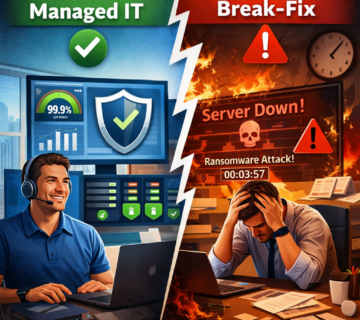
Managed IT Services vs. Break-Fix Support Models
Business owners often face the decision between traditional break-fix IT support—where you pay technicians by the hour to fix problems as they occur—and managed IT services with continuous monitoring and proactive maintenance. Understanding the fundamental differences helps clarify which model aligns with modern business requirements.
Break-Fix Model Characteristics: Under break-fix arrangements, businesses call IT support providers when something breaks. The provider dispatches a technician who diagnoses the problem, implements repairs, and bills hourly for time and materials. This model resembles calling a plumber when pipes burst or an electrician when circuits fail.
The break-fix approach has several inherent limitations. First, it creates misaligned incentives—the provider profits when systems fail and earns nothing when everything works smoothly. Second, it provides no visibility into system health between failures, meaning small problems grow into major crises. Third, it offers no cost predictability—IT expenses vary wildly month to month depending on what breaks. Fourth, it encourages deferring preventive maintenance because there’s no immediate crisis requiring attention.
Managed Services Model Characteristics: Managed IT services flip the traditional model by charging predictable monthly fees that include continuous monitoring, proactive maintenance, helpdesk support, and strategic planning. The provider assumes responsibility for keeping systems healthy and operational rather than simply responding when failures occur.
This approach aligns incentives—the provider profits by preventing problems rather than billing for emergency repairs. It provides continuous visibility through monitoring platforms that detect issues early. It offers cost predictability through fixed monthly fees that make IT expenses a predictable operating cost rather than variable capital expenses. It emphasizes prevention through regular maintenance, updates, and optimization.
Financial Comparison: Consider a hypothetical scenario. A business using break-fix support averages $2,000 monthly in IT expenses but experiences high variability—some months cost $500 while others spike to $8,000 during crises. Annual IT costs total approximately $24,000. However, this doesn’t include hidden costs like downtime, lost productivity during outages, emergency parts shipping fees, and overtime charges for after-hours repairs. True total cost likely approaches $35,000-40,000 annually.
The same business under managed services might pay $3,000 monthly ($36,000 annually) for comprehensive monitoring, maintenance, and support. While this appears more expensive initially, it typically eliminates most of the hidden costs associated with reactive support. Downtime decreases by 60-80%, emergency repair costs disappear, and productivity losses drop substantially. True total cost of ownership often decreases despite higher monthly fees.
Risk Management: Beyond financial considerations, managed services provide superior risk management. Continuous monitoring and proactive maintenance significantly reduce the probability of catastrophic failures, data loss incidents, and prolonged outages. For businesses where downtime directly impacts revenue or customer relationships, this risk reduction justifies managed service investments even if direct costs were equivalent to break-fix models.
Strategic Value: Perhaps the most significant difference lies in strategic partnership versus transactional relationships. Break-fix providers have little incentive to understand your business strategy, recommend improvements, or plan for future growth. Managed service providers become invested in your success because their ongoing revenue depends on your satisfaction and business continuity.
For most small and medium-sized businesses operating in competitive markets where technology enables business processes, managed IT services with 24/7 monitoring deliver substantially better value than traditional break-fix models. The shift from reactive to proactive IT support represents one of the most impactful operational improvements businesses can make.
FAQs About 24/7 IT Support in Irvine
How much does 24/7 IT support cost for a small business?
Comprehensive 24/7 IT support typically ranges from $125-175 per user per month depending on your infrastructure complexity, industry requirements, and service scope. This includes continuous monitoring, proactive maintenance, unlimited helpdesk support, security management, and strategic planning. Most providers offer customized pricing based on your specific needs rather than one-size-fits-all packages. The investment typically pays for itself through prevented downtime and eliminated emergency repair costs within the first year.
Will continuous monitoring slow down my systems?
Modern monitoring agents are designed to be lightweight and consume minimal system resources—typically less than 1% of CPU capacity and 50-100MB of memory. The monitoring software runs as background processes that don’t interfere with normal operations. In fact, monitoring often improves system performance by identifying bottlenecks, resource constraints, and optimization opportunities that would otherwise remain unnoticed.
Can monitoring work with cloud services like Microsoft 365?
Yes, comprehensive monitoring extends beyond on-premises infrastructure to include cloud platforms. Microsoft 365, Azure, AWS, Salesforce, and other SaaS applications can all be monitored for availability, performance, security configuration, and licensing utilization. Cloud monitoring ensures you receive alerts if service disruptions occur or if security settings deviate from organizational policies.
What happens if my internet connection fails—can IT support still help?
Internet outages present unique challenges for remote support. However, professional IT support providers implement multiple connectivity paths. Many deploy backup cellular connections for critical infrastructure that enable continued monitoring and management even during primary internet failures. Additionally, support teams can guide you through diagnostic steps via phone, dispatch on-site technicians if needed, or work with your internet service provider to expedite repairs.
How quickly will someone respond if monitoring detects a problem at 2 AM?
Response times depend on incident severity as defined in service level agreements. Critical issues affecting all users typically trigger immediate response—often within 15 minutes. Lower-severity issues might have slightly longer response windows but still receive attention during overnight hours. The key advantage of 24/7 monitoring is that problems get detected and addressed immediately regardless of when they occur, rather than waiting until the next business day when users arrive and report issues.
Do I still need internal IT staff if I have 24/7 managed IT support?
Many small and medium-sized businesses successfully operate without dedicated internal IT staff by partnering with comprehensive managed service providers. The provider handles all technical aspects—monitoring, maintenance, security, helpdesk, and strategy. However, some businesses prefer hybrid models where internal staff handles immediate user needs and works closely with external providers on infrastructure management. The right model depends on your business size, technology complexity, and internal expertise.
What’s the difference between a basic helpdesk and 24/7 IT support?
Basic helpdesks provide reactive assistance during business hours—answering questions, resetting passwords, and troubleshooting user problems. Comprehensive 24/7 IT support includes helpdesk functions but adds continuous monitoring, proactive maintenance, security management, after-hours support, disaster recovery planning, and strategic technology guidance. It’s the difference between having someone to call when problems occur versus having an IT team actively working to prevent problems from occurring.
How do I transition from my current IT support to a new provider?
Professional IT support providers manage the entire transition process. This typically includes discovery and assessment of your current environment, documentation of existing configurations, migration planning, phased implementation of monitoring systems, knowledge transfer meetings, and parallel support during the transition period. Most transitions complete within 30-60 days with minimal disruption to daily operations.
Can monitoring detect security threats or just technical problems?
Advanced monitoring platforms include security monitoring capabilities that detect indicators of compromise, suspicious activity, policy violations, and potential breaches. This includes monitoring authentication logs for unauthorized access attempts, tracking file integrity to detect malware, analyzing network traffic for suspicious patterns, and alerting on security configuration changes. Comprehensive cybersecurity services integrate security monitoring into overall IT support rather than treating it as a separate function.
What happens to monitoring data—who can see it and how is it secured?
Monitoring data includes potentially sensitive information about your infrastructure, so security is paramount. Professional providers encrypt monitoring data in transit and at rest, implement strict access controls limiting data visibility to authorized support staff, and maintain compliance with industry security standards. Most service agreements include clear data handling and confidentiality provisions. You typically retain ownership of all monitoring data and can request reports or exports at any time.
The Future of IT Support: AI, Automation, and Predictive Analytics
As technology advances, IT support continues evolving beyond traditional monitoring and reactive problem-solving toward predictive systems that anticipate issues before warning indicators even appear.
Artificial Intelligence Integration: Modern monitoring platforms increasingly incorporate AI and machine learning algorithms that analyze patterns across thousands of systems to predict failures before they occur. For example, AI systems might analyze three months of server performance data and predict that a particular hard drive will fail within the next two weeks based on subtle patterns in read/write errors, sector remapping, and temperature fluctuations—even before traditional SMART warnings appear.
Automated Remediation: Beyond simply alerting on problems, next-generation monitoring implements automated remediation that resolves common issues without human intervention. When disk space runs low, intelligent systems might automatically clear temporary files, archive old logs, or allocate additional storage from virtualized infrastructure. When applications crash, automated systems restart services, verify functionality, and only alert humans if automated recovery fails.
Predictive Analytics: Advanced analytics platforms correlate data across multiple systems to identify trends and predict future capacity needs, security threats, and optimization opportunities. Rather than waiting for storage to fill or networks to saturate, predictive models forecast when capacity will become constrained based on historical growth patterns, enabling proactive upgrades during planned maintenance windows.
Self-Healing Infrastructure: Emerging technologies enable self-healing systems that automatically detect, diagnose, and remediate problems without human involvement. Virtualized infrastructure can automatically migrate workloads away from failing hardware, spin up replacement systems, and restore service continuity—all within minutes of detecting issues.
Enhanced User Experience: AI-powered helpdesk systems provide increasingly sophisticated self-service capabilities where employees can resolve common problems through conversational interfaces that understand natural language questions and guide users through troubleshooting steps. This reduces the burden on support teams while providing faster problem resolution for routine issues.
Security Automation: Automated security response systems detect and contain threats faster than human analysts. When monitoring systems detect indicators of compromise, automated responses might immediately isolate affected systems, block suspicious network traffic, force password resets, and initiate forensic data collection—all within seconds of detection.
Integration with Business Intelligence: Future IT monitoring will increasingly integrate with business intelligence systems, correlating IT performance with business outcomes. Organizations will be able to directly measure how infrastructure improvements impact revenue, customer satisfaction, and operational efficiency, enabling data-driven technology investment decisions.
While human expertise remains essential for strategic planning, complex troubleshooting, and decision-making during major incidents, automation and AI are steadily handling more routine monitoring and maintenance tasks. This evolution enables IT support teams to focus on higher-value activities like security improvement, capacity planning, and technology innovation that directly enable business growth.
Local Advantages: Why Irvine Businesses Benefit from Regional IT Support
While remote monitoring technology enables IT support from anywhere, businesses throughout Irvine and Orange County gain distinct advantages from partnering with local providers who understand regional business dynamics, maintain physical presence, and participate in local business communities.
Rapid On-Site Response: Despite remote management capabilities handling most issues, some problems require physical intervention—hardware replacement, cable repairs, equipment installation, or hands-on troubleshooting. Local IT support providers can dispatch technicians to your Irvine location within hours rather than coordinating with distant vendors for next-day or multi-day response windows. This speed advantage proves invaluable during critical situations where every hour of downtime impacts revenue.
Relationship Building: Face-to-face interactions foster stronger working relationships than purely remote arrangements. When support technicians visit your office regularly, they develop deeper understanding of your business operations, build rapport with your team, and provide more personalized service. These relationships often lead to better communication, more effective problem-solving, and proactive recommendations tailored to your specific situation.
Local Infrastructure Knowledge: Regional IT providers understand the specific telecommunications infrastructure, internet service provider options, and connectivity challenges common to Irvine and Orange County. They maintain relationships with local vendors, know which providers deliver reliable service in different areas, and can navigate local considerations that distant providers might miss.
Business Community Integration: Local IT support providers often participate in regional business organizations, industry associations, and professional networks. These connections facilitate collaboration, knowledge sharing, and referrals to complementary service providers. When your IT partner maintains active involvement in the local business community, you benefit from their network and relationships.
Compliance Understanding: California maintains specific regulations regarding data privacy, breach notification, and electronic records retention that differ from other states. Local IT providers understand these requirements and ensure your infrastructure maintains compliance with California-specific regulations in addition to federal standards.
Economic Impact: Supporting local businesses strengthens the regional economy. When you partner with an Irvine-based IT support provider, your technology investment circulates through the local economy, supporting local jobs and contributing to community prosperity.
Cultural Alignment: Regional providers understand the business culture, work styles, and industry dynamics specific to Orange County. This cultural alignment facilitates more effective communication and ensures technology recommendations align with local business expectations and practices.
Emergency Coordination: During regional emergencies—earthquakes, wildfires, power outages, or other disasters—local IT providers can coordinate response more effectively than distant vendors. They understand local conditions, can physically access your facilities when needed, and often maintain backup operations centers within the region to ensure service continuity during widespread disruptions.
While technology enables effective remote IT support from anywhere, the combination of advanced remote monitoring with local presence and relationships creates optimal support partnerships. Businesses gain the efficiency of modern monitoring technology alongside the responsiveness and relationship depth that local partnerships provide.
How Technijian Can Help
Technijian has served Orange County businesses since 2000, providing comprehensive managed IT services that combine advanced monitoring technology with responsive local support. Our 24/7 Network Operations Center continuously monitors client systems, identifying potential issues before they impact operations and enabling our team to address problems proactively rather than reactively.
Our approach integrates deep technical expertise with genuine partnership mentality. We take time to understand each client’s business objectives, industry requirements, and operational priorities, then design technology solutions that enable rather than hinder business success. Whether you’re a healthcare practice requiring HIPAA compliance, a professional services firm needing reliable client communication, or a manufacturing company depending on operational technology, we bring industry-specific experience to every engagement.
Our monitoring scope extends across your entire IT environment—servers, workstations, network infrastructure, cloud services, security systems, backup platforms, and business applications. This comprehensive visibility enables us to correlate information across systems, identifying root causes rather than treating symptoms. When issues arise, our multi-tiered support structure ensures problems reach technicians with appropriate expertise, accelerating resolution while maintaining cost efficiency.
Beyond monitoring and reactive support, we provide strategic technology guidance that aligns IT investments with business goals. Our team advises on infrastructure upgrades, security enhancements, compliance requirements, disaster recovery planning, and technology lifecycle management. We view ourselves as extensions of your team—technology partners invested in your long-term success.
Our IT support services include clearly documented service level agreements specifying response times for different incident priorities, transparent pricing with no surprise bills, and comprehensive documentation of your infrastructure configurations. We maintain regular communication through scheduled reviews, proactive status updates, and immediate notification during critical incidents.
For businesses considering the transition from reactive break-fix support to comprehensive managed services, we offer complimentary IT assessments that evaluate your current environment, identify potential risks, and recommend roadmaps for improvement. These assessments provide valuable insights regardless of whether we ultimately become your IT partner.
Technology should enable your business, not frustrate your team or disrupt your operations. When systems work reliably, employees remain productive, customers receive consistent service, and business owners can focus on growth rather than managing technical crises. This is the fundamental value that comprehensive 24/7 IT support delivers—peace of mind knowing that experienced professionals are actively monitoring your infrastructure, preventing problems, and ready to respond whenever issues arise.
If you’re ready to eliminate the stress and cost of reactive IT support and experience the business benefits of proactive monitoring, we invite you to schedule a free IT uptime assessment. During this consultation, we’ll evaluate your current infrastructure, discuss your business objectives, and demonstrate how comprehensive monitoring prevents the downtime that undermines productivity and profitability. Contact Technijian today and discover how modern IT support transforms technology from a source of frustration into a competitive advantage.