HIPAA IT Checklist for Medical Practices: Complete 2026 Compliance Guide
🎙️ Dive Deeper with Our Podcast!
Article Summary
You have a HIPAA audit coming up, and you’re not entirely sure your IT systems will pass. Or maybe your cyber insurance company just sent you a list of security requirements that reads like a foreign language. Perhaps you heard about another medical practice in Orange County getting hit with ransomware, and now you’re lying awake wondering if you’re next.
Whatever brought you here, you need answers. Not vague recommendations or theoretical best practices. You need a concrete checklist that tells you exactly what your IT systems must have in place to satisfy HIPAA requirements.
This guide delivers that checklist. We’ll cover every technical safeguard HIPAA requires, explain what auditors actually look for, and show you how to document everything properly. By the end, you’ll know exactly where your practice stands and what needs to happen next.
Understanding HIPAA Technical Safeguards
Before diving into the checklist, let’s clarify what we’re dealing with. HIPAA’s Security Rule requires three types of safeguards: administrative, physical, and technical. This guide focuses on technical safeguards because that’s where most practices struggle, and that’s where IT expertise makes the biggest difference.
Technical safeguards are the technology and related policies that protect electronic protected health information, commonly called ePHI. Every patient record in your EHR, every email containing patient information, every backup file with clinical data falls under these requirements.
The Department of Health and Human Services doesn’t specify exactly which technologies you must use. Instead, they require you to implement reasonable and appropriate measures based on your practice’s size, complexity, and capabilities. This flexibility sounds helpful until you realize it means there’s no simple “buy this software and you’re compliant” solution.
What auditors want to see is that you’ve assessed your risks, implemented appropriate protections, and documented everything. That documentation piece trips up most practices. You might have excellent security in place but still fail an audit because you can’t prove it.
The Complete HIPAA IT Compliance Checklist
Let’s get into the specific requirements. For each item, we’ll explain what it means, why it matters, and what auditors look for.
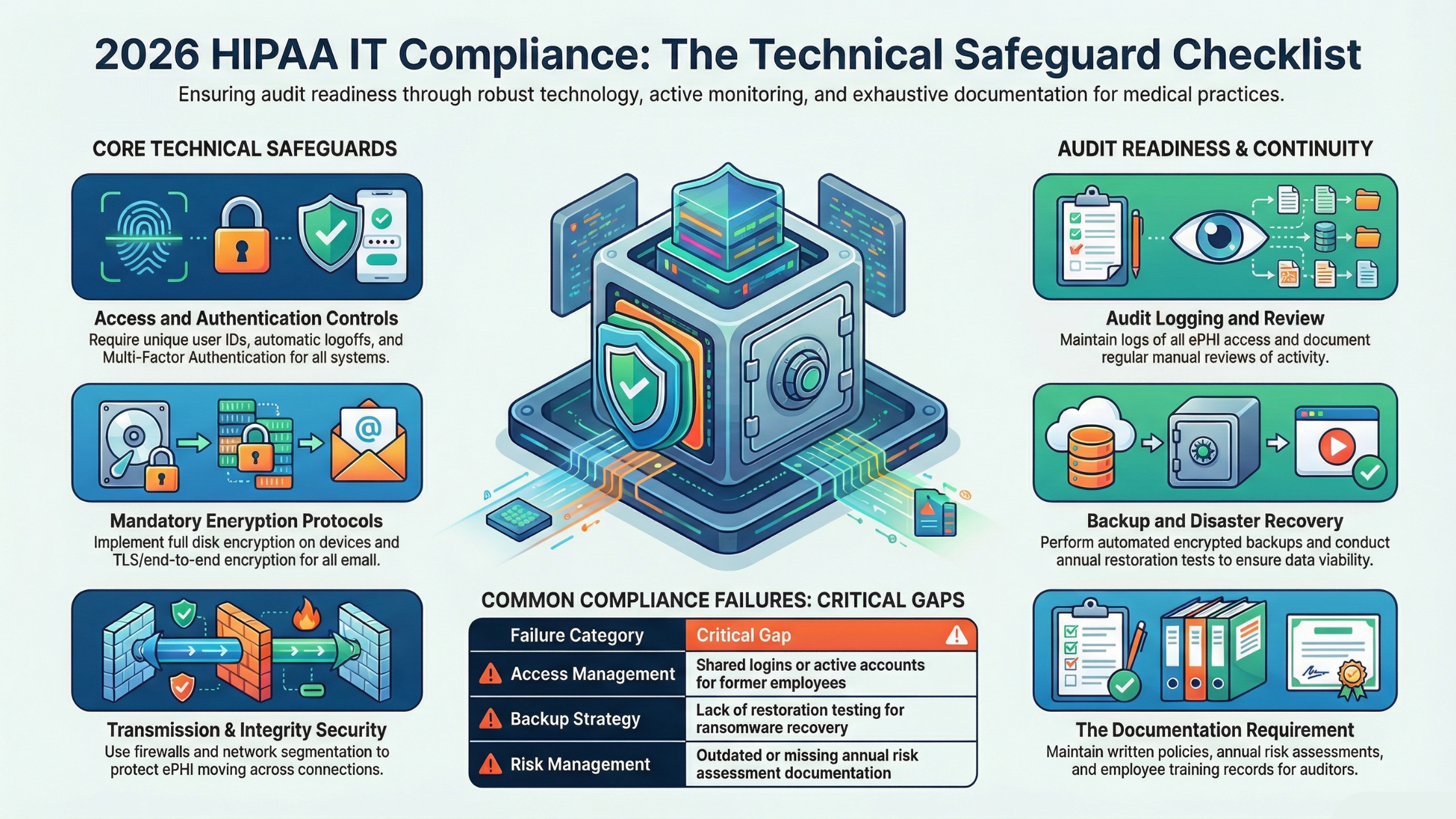
Access Controls
Access controls determine who can view, modify, or transmit ePHI. HIPAA requires you to implement policies and procedures that limit access to only those who need it for their job functions.
Unique User Identification
Every person who accesses systems containing ePHI must have their own unique username. No shared logins, ever. When the front desk staff all use the same “frontdesk” login, you have a compliance violation and a security risk. If something goes wrong, you can’t determine who did what.
Your checklist should confirm that every employee has a unique login for the EHR system, every employee has a unique login for computers and workstations, shared accounts have been eliminated completely, and login credentials are never written down or shared.
Emergency Access Procedures
You need documented procedures for accessing ePHI during emergencies. What happens if your primary system goes down? How does staff access patient information during a power outage or system failure? These scenarios must be planned in advance with documented procedures.
Automatic Logoff
Workstations must automatically lock or log off after a period of inactivity. The specific timeout period should be based on your environment, but 15 minutes is a common standard. This prevents unauthorized access when staff walk away from computers.
Your systems should have automatic screen lock enabled on all workstations, EHR sessions that timeout after inactivity, and clear policies about manually locking computers when stepping away.
Encryption and Decryption
HIPAA considers encryption “addressable,” meaning you must implement it unless you can document why an alternative measure is equally effective. In practice, there’s rarely a valid reason not to encrypt ePHI.
Your encryption requirements include full disk encryption on all computers and laptops, encrypted email when sending patient information, encrypted connections to your EHR whether cloud-based or on-premise, and encrypted backup files.
Audit Controls
HIPAA requires you to implement mechanisms that record and examine activity in systems containing ePHI. This means maintaining logs of who accessed what, when, and what they did with it.
System Activity Logs
Your EHR system should log every access to patient records. These logs must capture who accessed the record, when they accessed it, and what actions they took. Most modern EHR systems have this built in, but you need to verify it’s enabled and configured correctly.
Beyond the EHR, you need logging on network devices and firewalls, servers containing ePHI, workstations in clinical areas, and any system that touches patient data.
Log Review Procedures
Having logs isn’t enough. You must regularly review them to detect unauthorized access or suspicious activity. Document your review procedures, who’s responsible for reviews, how often they occur, and what triggers further investigation.
Many practices fail here because they have logs but never look at them. When an auditor asks, “How do you review access logs?” you need a concrete answer with documented procedures.
Integrity Controls
Integrity controls protect ePHI from improper alteration or destruction. Your systems must ensure that patient data isn’t accidentally or maliciously modified.
Data Validation
Implement mechanisms to verify that ePHI hasn’t been altered or destroyed improperly. This includes checksums or hash values for backup files, database integrity checking, and alerts for unexpected data modifications.
Error Correction
When integrity problems are detected, you need procedures to correct them. This ties into your backup and recovery capabilities, which we’ll cover shortly.
Transmission Security
Any time ePHI moves across a network, it must be protected. This applies to data transmitted within your office, to external systems, or to patients.
Encryption in Transit
All ePHI transmitted over networks must be encrypted. This includes data sent to cloud-based EHR systems, emails containing patient information, faxes sent via internet fax services, patient portal communications, and connections to labs, pharmacies, or other providers.
For web-based systems, look for HTTPS connections with valid certificates. For email, implement TLS encryption at minimum, with end-to-end encryption for sensitive communications.
Network Security
Your network infrastructure must protect ePHI during transmission. Requirements include properly configured firewalls separating your network from the internet, segmented networks keeping clinical systems separate from guest WiFi, intrusion detection or prevention systems monitoring for threats, and secure WiFi with WPA3 or WPA2-Enterprise encryption.
Authentication
Authentication verifies that the person accessing ePHI is who they claim to be. Simple passwords aren’t sufficient for most healthcare environments anymore.
Multi-Factor Authentication
MFA requires users to prove their identity through multiple methods, typically something they know like a password, something they have like a phone or token, or something they are like a fingerprint. HIPAA doesn’t explicitly require MFA, but it’s become an expected standard. Most cyber insurance policies now mandate it, and auditors view its absence as a significant gap.
Implement MFA for EHR access, email access especially for remote access, VPN connections for remote work, and any administrative access to servers or network devices.
Password Policies
Your password policies should require minimum length of at least 12 characters, complexity requirements including mixed case, numbers, and symbols, password expiration with frequency based on risk assessment, prohibition of password reuse, and account lockout after failed attempts.
Backup and Disaster Recovery Requirements
HIPAA requires you to maintain retrievable exact copies of ePHI. This goes beyond simply having backups. You must be able to restore operations within a reasonable timeframe.
Backup Requirements
Your backup strategy must include regular automated backups of all systems containing ePHI, offsite or cloud storage of backup copies, encryption of backup files, regular testing of backup restoration, and documented retention periods.
How often should you back up? Daily at minimum for most practices, with more frequent backups for high-volume environments. Critical systems might need hourly or real-time replication.
Disaster Recovery Planning
You need a documented disaster recovery plan that addresses how you’ll restore systems after hardware failures, how you’ll recover from ransomware or cyberattacks, what you’ll do if your facility is inaccessible, and how you’ll maintain patient care during extended outages.
The plan must be documented, tested regularly, and updated when your environment changes. “We’ll figure it out when it happens” isn’t a compliance strategy.
Testing Your Backups
Untested backups might as well not exist. Many practices discover their backups don’t work only when they desperately need them. Your backup testing should include monthly verification that backups completed successfully, quarterly test restores of sample data, annual full disaster recovery testing, and documentation of all testing activities and results.
Device and Media Controls
HIPAA requires policies governing how devices containing ePHI are handled throughout their lifecycle.
Workstation Security
Every computer that accesses ePHI needs physical security considerations including screen positioning to prevent unauthorized viewing, automatic screen locks when unattended, physical security in accessible areas, and clear desk policies for printed patient information.
Mobile Device Management
If staff access ePHI from smartphones, tablets, or laptops, you need mobile device management policies covering required encryption on all mobile devices, remote wipe capability for lost or stolen devices, prohibited storage of ePHI on personal devices without proper controls, and secure containers separating work data from personal data.
Media Disposal
When computers, hard drives, or other media containing ePHI reach end of life, you must ensure complete destruction of all data. Simple deletion isn’t sufficient because data can be recovered from formatted drives.
Acceptable disposal methods include certified data destruction with documentation, physical destruction such as shredding or degaussing, and NIST-compliant data wiping with verification. Keep certificates of destruction for all disposed media. Auditors will ask.
Documentation Requirements
Here’s where many practices fail even when their actual security is solid. HIPAA requires extensive documentation that proves your compliance efforts.
Required Policies and Procedures
You must have written policies covering access control and user management, security incident response, backup and disaster recovery, workstation and device security, password and authentication requirements, email and communication security, business associate management, and employee security training.
These can’t be generic templates pulled from the internet. They must reflect your actual practices and environment.
Risk Assessment Documentation
HIPAA requires periodic risk assessments to identify vulnerabilities and threats to ePHI. Your risk assessment documentation must include methodology used for the assessment, identified threats and vulnerabilities, evaluation of current security measures, risk ratings for identified gaps, and remediation plans with timelines.
Risk assessments should be conducted at least annually, and whenever significant changes occur in your environment.
Training Records
Every employee must receive HIPAA training, and you must document it. Training records should show what topics were covered, when training occurred, who attended, acknowledgment of understanding, and any testing or competency verification.
New employees need training upon hire. Existing staff need refresher training at least annually.
Incident Documentation
When security incidents occur, document everything. What happened, when it was discovered, what systems were affected, what actions were taken, and what changes resulted. Even minor incidents should be documented because patterns of small issues can reveal larger problems.
What Auditors Actually Look For
Understanding the auditor’s perspective helps you prepare effectively. Auditors aren’t trying to catch you on technicalities. They want to see that you take patient data protection seriously and have implemented reasonable measures.
Evidence of Active Management
Auditors look for evidence that security is actively managed, not just initially implemented and forgotten. They want to see recent policy reviews and updates, current training records, recent risk assessments, evidence of ongoing monitoring, and incident response activities.
If your last risk assessment was three years ago, that’s a problem. If your policies haven’t been reviewed since they were created, that’s a problem.
Consistency Between Policies and Practice
What you document must match what you actually do. If your policy says passwords expire every 90 days but your systems aren’t configured that way, you have a compliance gap. Auditors will check whether your stated policies are actually implemented.
Response to Identified Risks
When risk assessments identify gaps, auditors expect to see remediation efforts. You don’t have to fix everything immediately, but you need documented plans with reasonable timelines. “We identified this risk two years ago and haven’t addressed it” raises serious concerns.
Business Associate Agreements
Every vendor who accesses ePHI must have a signed Business Associate Agreement. This includes your EHR vendor, IT support provider, cloud backup service, shredding company, and any other third party handling patient data. Auditors will ask for a list of business associates and copies of agreements.
Common Compliance Failures in Orange County Practices
Based on our experience working with medical practices throughout Irvine, Santa Ana, Anaheim, and surrounding Orange County cities, certain issues appear repeatedly.
Inadequate Access Management
We frequently find practices where former employees still have active accounts, staff have access to information beyond what their job requires, and shared logins are used for convenience. Any of these creates compliance violations and security risks.
Missing or Outdated Documentation
Many practices have implemented good security measures but can’t prove it. Policies were created once and never updated. Risk assessments were done years ago. Training records are incomplete or missing.
Insufficient Backup Testing
Practices often have backup systems in place but have never tested restoration. When ransomware hits or hardware fails, they discover their backups are corrupted, incomplete, or impossible to restore quickly.
Lack of Encryption
Especially problematic on laptops and mobile devices that could be lost or stolen. Full disk encryption should be standard on any device that might contain or access ePHI.
No Formal Incident Response
When security incidents occur, practices often handle them ad hoc without documentation. This creates compliance problems and misses opportunities to improve security.
Building Your Compliance Program
Compliance isn’t a one-time project but an ongoing program. Here’s how to structure yours.
Start with a Risk Assessment
Before implementing new measures, understand your current state. A thorough risk assessment identifies where you’re vulnerable, what assets need protection, and what threats you face. This assessment guides your priorities and resource allocation.
Address Critical Gaps First
You probably can’t fix everything immediately. Prioritize based on risk level. Issues that could lead to large-scale data exposure or significant patient harm should be addressed first. Document your prioritization rationale.
Implement Sustainable Processes
One-time fixes don’t create lasting compliance. Build processes that maintain security over time. Automated monitoring that alerts you to problems. Regular review schedules built into calendars. Training programs that run consistently.
Partner with Qualified IT Support
HIPAA compliance requires IT expertise most practices don’t have internally. Working with an IT provider experienced in healthcare compliance provides access to specialized knowledge, consistent application of best practices, documentation and audit support, and ongoing monitoring and management.
Not all IT providers understand healthcare requirements. Look for demonstrated healthcare experience, willingness to sign Business Associate Agreements, familiarity with HIPAA technical requirements, and experience supporting practices through audits.
Taking Action on Your Compliance
This checklist gives you the framework, but implementation requires expertise and dedicated effort. Most practice administrators and office managers don’t have time to become HIPAA IT experts while running day-to-day operations.
If your internal review reveals gaps, or if you’re unsure about your compliance status, professional assessment provides clarity. A qualified IT partner can evaluate your current state against requirements, identify specific gaps and risks, recommend prioritized remediation steps, implement necessary technical controls, create and maintain required documentation, and provide ongoing compliance monitoring.
Frequently Asked Questions
What are the HIPAA technical safeguard requirements?
HIPAA technical safeguards include access controls limiting who can view ePHI, audit controls tracking system activity, integrity controls preventing improper data modification, transmission security protecting data in transit, and authentication verifying user identity. Each category has specific implementation requirements detailed in the Security Rule.
How often should medical practices conduct HIPAA risk assessments?
HIPAA requires periodic risk assessments without specifying exact frequency. Best practice is annual assessments at minimum, with additional assessments when significant changes occur such as new systems, new locations, or after security incidents. Document assessment frequency in your policies.
What happens if a medical practice fails a HIPAA audit?
Audit outcomes depend on the nature and severity of violations. Minor issues typically result in corrective action plans. Significant violations can result in fines ranging from $100 to $50,000 per violation, with annual maximums up to $1.5 million per violation category. Willful neglect carries the highest penalties.
Is encryption required for HIPAA compliance?
HIPAA classifies encryption as “addressable,” meaning you must implement it unless you document why an equivalent alternative protection exists. In practice, encryption is expected for ePHI at rest on devices and servers, ePHI in transit across networks, backup files, and mobile devices. There’s rarely a valid reason not to encrypt.
Do small medical practices need the same HIPAA compliance as large hospitals?
HIPAA applies equally to all covered entities regardless of size. However, the Security Rule allows flexibility in implementation based on practice size, complexity, and capabilities. A small practice might implement simpler technical solutions than a hospital while still meeting compliance requirements. Documentation of how you determined appropriate measures for your size is important.
What documentation do HIPAA auditors request?
Auditors typically request policies and procedures for all Security Rule requirements, recent risk assessments with remediation plans, employee training records, business associate agreements, incident documentation, system access logs and review records, and evidence of backup testing. Having organized documentation readily available demonstrates compliance maturity.
How do cyber insurance requirements relate to HIPAA compliance?
Cyber insurance requirements often overlap with and sometimes exceed HIPAA requirements. Many insurers now mandate multi-factor authentication, endpoint detection and response, security awareness training, and backup verification. Meeting both HIPAA requirements and cyber insurance mandates often requires the same underlying security measures.
Get Your Practice Audit-Ready
Reviewing this checklist probably raised questions about your current compliance status. That’s normal because HIPAA compliance is complex, and most practices have gaps they don’t know about.
Free HIPAA Readiness Assessment
Technijian offers a no-obligation HIPAA readiness assessment for Orange County medical practices. We’ll evaluate your current technical safeguards, identify compliance gaps, and provide a prioritized remediation roadmap.
Our assessment covers access controls and authentication, encryption status across all systems, backup and disaster recovery capabilities, documentation review, and security policy evaluation.
You’ll receive a clear report showing where you stand and what needs attention, with no pressure or obligations.
Call (949) 379-8500 or Schedule Your HIPAA Assessment
Technijian provides HIPAA-compliant IT services to medical practices throughout Orange County, including Irvine, Santa Ana, Anaheim, Costa Mesa, Newport Beach, and Huntington Beach. We’ve helped healthcare providers pass audits, respond to incidents, and maintain ongoing compliance since 2000.