Co-Managed IT: What Tasks We Take Off Your Plate (With SLA Examples)
🎙️ Dive Deeper with Our Podcast!
Article Summary
Struggling to balance daily IT tickets with strategic projects? Co-managed IT services provide the backup your team needs without losing control. This comprehensive guide details 25 specific tasks Technijian takes off your plate—from Tier 1 help desk support and after-hours coverage to security monitoring and compliance documentation. See real SLA commitments including 15-minute response for critical issues and 99.9% uptime guarantees. Learn typical Orange County pricing ($15-100 per user monthly), how the partnership structure works with shared ticketing and weekly syncs, and the 7 warning signs your IT team needs co-managed support. Includes 10 FAQs addressing common concerns.
What Tasks We Take Off Your Plate (With SLA Examples)
You didn’t become an IT Manager to spend your days resetting passwords and troubleshooting printer jams. You got into this field to build systems, lead migrations, and drive technology strategy that moves your company forward. But right now, you’re buried under a mountain of help desk tickets while that critical cloud migration sits untouched on your to-do list.
If this sounds familiar, you’re not alone. IT Managers across Orange County are facing the same impossible choice: handle the daily fires or focus on strategic projects. The good news? You don’t have to choose. Co-managed IT services give you the backup support you need without losing control of your department.
At Technijian, we’ve partnered with IT teams throughout Irvine, Anaheim, Santa Ana, and greater Orange County since 2000. We know that you don’t want to be replaced—you want reinforcements. This guide breaks down exactly which tasks we take off your plate, complete with real SLA examples so you know precisely what to expect.
What Is Co-Managed IT? (And Why It’s Different from Full Outsourcing)
Co-managed IT is a partnership model where your internal IT team works alongside an external managed services provider. Unlike full outsourcing—where an MSP takes over all IT functions—co-managed IT lets you keep control while offloading specific tasks that drain your time and energy.
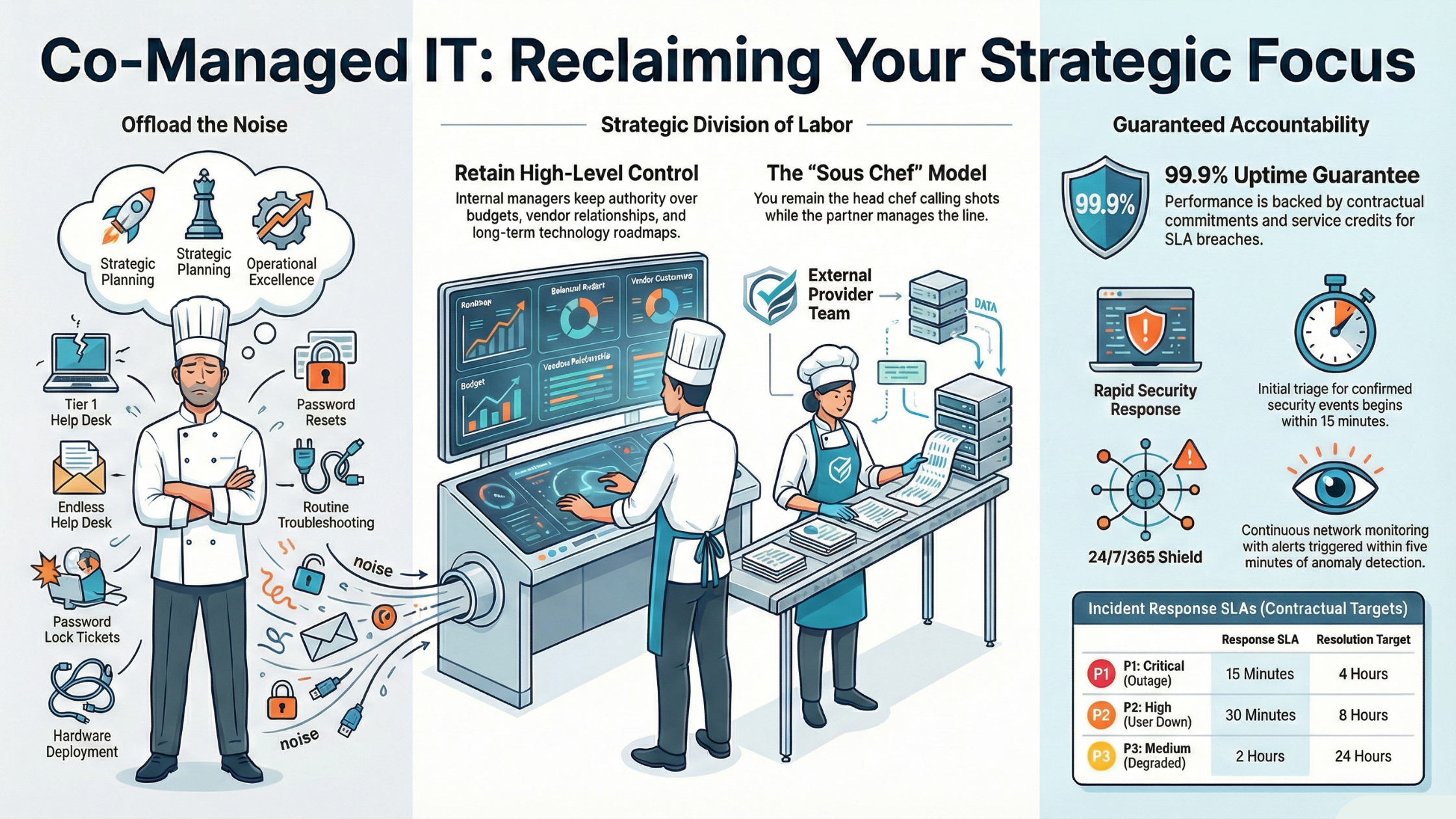
Think of it this way: if your IT department were a restaurant kitchen, you’d still be the head chef calling the shots on the menu and major decisions. We’re the sous chefs handling prep work, managing the line during rushes, and keeping the kitchen running smoothly so you can focus on creating the dishes that make your restaurant stand out.
The Co-Managed Advantage for Orange County IT Teams
Orange County businesses face unique challenges. You’re competing for talent with major tech companies in Irvine’s tech corridor, managing compliance requirements across healthcare in Santa Ana, defense contractors throughout the region, and professional services firms in Costa Mesa and Newport Beach. Your team needs specialized skills across multiple domains—but hiring full-time staff for every specialty isn’t realistic.
Co-managed IT services Orange County providers like Technijian give you access to certified experts in cybersecurity, cloud infrastructure, compliance frameworks, and 24/7 monitoring—all without adding headcount to your payroll.
The 25 Tasks We Take Off Your Plate
Every IT department is different, so co-managed partnerships are flexible. Below are the most common responsibilities our Orange County clients hand off to us. Pick and choose based on your team’s needs.
Help Desk and End-User Support
- Tier 1 Help Desk Tickets— Password resets, account lockouts, basic software issues, and routine troubleshooting that eat up your day.
- Tier 2 Escalations— More complex issues requiring deeper technical investigation but not strategic decision-making.
- After-Hours Support Coverage—Stop being on call 24/7. We handle nights, weekends, and holiday emergencies.
- New Employee Onboarding— Account provisioning, workstation setup, and first-day readiness for new hires.
- Employee Offboarding— Secure account deactivation, access revocation, and equipment recovery.
Infrastructure Monitoring and Management
- 24/7 Network Monitoring— Continuous monitoring of your network infrastructure with real-time alerting.
- Server Monitoring and Maintenance— Performance monitoring, capacity planning, and routine maintenance tasks.
- Patch Management— Operating system and third-party application patching on your schedule.
- Backup Monitoring and Testing— Daily backup verification and quarterly restore testing to ensure recoverability.
- Endpoint Management— Workstation and laptop deployment, updates, and lifecycle management.
Security Operations
- Security Monitoring (SIEM/SOC)— 24/7 security event monitoring and threat detection through our Security Operations Center.
- Endpoint Detection and Response (EDR)— Advanced threat protection beyond traditional antivirus.
- Vulnerability Scanning— Regular vulnerability assessments with prioritized remediation recommendations.
- Security Awareness Training— Phishing simulations and security training for your end users.
- Incident Response Support— Expertassistance when security incidents occur, including forensics and remediation.
Cloud and Microsoft 365 Administration
- Microsoft 365 Administration— User management, license optimization, and configuration management.
- Azure/AWS Management— Cloud infrastructure monitoring, optimization, and cost management.
- Email Security Management— Spam filtering, email authentication (SPF/DKIM/DMARC), and threat protection.
- Cloud Backup Management— Microsoft 365 and cloud application backup configuration and monitoring.
Compliance and Documentation Support
- Compliance Monitoring— HIPAA, SOC 2, CMMC, PCI-DSS, and NIST compliance monitoring and reporting.
- Audit Preparation Support— Documentation gathering and evidence collection for compliance audits.
- Policy Documentation— IT policy development and maintenance to meet compliance requirements.
- IT Asset Documentation— Maintainingaccurate hardware and software inventories.
Project and Strategic Support
- Project Overflow Support— Extra hands for migrations, rollouts, and infrastructure projects.
- Technology Consulting— Strategic guidance on technology decisions, vendor selection, and roadmap planning.
Real SLA Examples: What Response Times to Expect
One of the biggest concerns IT Managers have about co-managed partnerships is accountability. Will the external team respond as quickly as your internal staff? Here are the specific SLA commitments Technijian provides to our co-managed clients in Orange County:
Help Desk Response SLAs
Priority 1 (Critical) — System-wide outage, security breach, or complete work stoppage
Response Time: 15 minutes or less
Resolution Target: 4 hours
Priority 2 (High) — Single user down, critical application failure, or significant impact
Response Time: 30 minutes or less
Resolution Target: 8 hours
Priority 3 (Medium) — Degraded performance, workaround available, or non-critical issue
Response Time: 2 hours or less
Resolution Target: 24 hours
Priority 4 (Low) — Questions, requests, or minor issues with no immediate impact
Response Time: 4 hours or less
Resolution Target: 48 hours
Infrastructure and Security SLAs
Network Monitoring: 24/7/365 coverage with alerts triggered within 5 minutes of anomaly detection
Security Incident Response: Initial triage within 15 minutes for confirmed security events
Patch Deployment: Critical patches within 24 hours; standard patches within 7 days
Backup Verification: Daily backup status reports; quarterly restore testing with documented results
Uptime Guarantee: 99.9% uptime for monitored systems with service credits for SLA breaches
What Stays on Your Plate (And Why That’s a Good Thing)
Co-managed IT isn’t about replacing you—it’s about elevating your role. When you’re not drowning in tickets, you can focus on work that actually moves the business forward:
Strategic Technology Planning — You know your business better than anyone. Lead the technology roadmap that aligns IT with company goals.
Vendor Relationships — Maintain control over key vendor partnerships and contract negotiations.
Budget Management — Own the IT budget and make decisions about technology investments.
Executive Communication — You’re the face of IT to leadership. Report on progress, present initiatives, and secure buy-in.
Major Project Leadership — Lead that cloud migration, ERP implementation, or office relocation with proper focus.
Team Development — If you have internal staff, focus on their growth rather than just ticket triage.
How Much Does Co-Managed IT Cost in Orange County?
Co-managed IT pricing varies based on which services you need and how many users or devices are covered. Here’s what Orange County businesses typically invest:
Help Desk Only: $15-35 per user per month
Help Desk + Monitoring: $35-65 per user per month
Comprehensive Co-Managed (Help Desk + Monitoring + Security): $65-100 per user per month
After-Hours Support Add-On: $2,500-6,000 per month (based on ticket volume)
Project Support: $150-200 per hour or project-based pricing
Compare this to hiring: a single IT support technician in Orange County costs $55,000-75,000 in salary alone, plus benefits, training, and management overhead. For many organizations, co-managed IT provides more coverage at lower total cost.
How the Co-Managed Partnership Works
Successful co-managed relationships require clear boundaries and communication. Here’s how we structure partnerships at Technijian:
Shared Ticketing System — We either integrate with your existing PSA/ticketing system or provide access to ours. Complete visibility for both teams.
Clear Escalation Paths — Documented procedures for when issues escalate to your team and when they stay with us.
Weekly Status Meetings — Regular sync meetings to review tickets, discuss upcoming projects, and address any concerns.
Monthly Reporting — Detailed reports on ticket volume, resolution times, security events, and system health.
Quarterly Business Reviews — Strategic discussions about technology roadmap, upcoming needs, and partnership optimization.
Dedicated Account Manager — A single point of contact who knows your environment and can coordinate resources.
7 Signs Your Team Needs Co-Managed IT Support
Not sure if co-managed IT is right for your organization? Here are the warning signs we see most often:
- Your ticket queue never gets to zero— If tickets keep piling up no matter how hard your team works, you need more capacity.
- Strategic projects keep getting delayed— That cloud migration has been “starting next quarter” for two years.
- You’re on call 24/7— Burnout is real. If youcan’t take a vacation without your phone blowing up, something needs to change.
- Leadership is asking about security— They’ve heard about ransomware attacks and want assurances youcan’t confidently provide.
- You need skills youdon’thave — Cloud architecture, cybersecurity, compliance—your team can’t be experts in everything.
- User satisfaction is dropping— Employees are complaining about slow IT response times and unresolved issues.
- You’re losing good people— Your IT staff are burnt out and leaving for less stressful positions.
Why Orange County IT Teams Choose Technijian
Since 2000, Technijian has been the co-managed IT partner for businesses throughout Orange County. Here’s what sets us apart:
Local Presence, Local Knowledge — Our headquarters in Irvine means we understand Orange County business challenges and can be onsite when needed.
True Partnership Approach — We’re not trying to take over your job. We’re trying to make you more successful.
Compliance Expertise — HIPAA for healthcare, CMMC for defense contractors, SOC 2 for service providers, PCI-DSS for retail—we know the frameworks.
Flexible Engagement Models — Take what you need. Help desk only? Security monitoring only? Full co-managed? We customize the relationship.
Guaranteed SLAs — The response times we quote are backed by contractual commitments with service credits.
Ready to Get Your Time Back?
Stop spending your days buried in tickets. A 30-minute conversation with our team will show you exactly which tasks we can take off your plate—and how much time you’ll get back for strategic work.
Schedule a Free Co-Managed IT Consultation — We’ll review your current workload, discuss which services make sense for your team, and provide a customized proposal with specific SLA commitments.
Call (949) 379-8500 or visit technijian.com to get started.
— — —
Frequently Asked Questions About Co-Managed IT Services
What’s the difference between co-managed IT and fully managed IT?
With fully managed IT, the MSP takes complete responsibility for all IT functions—you have no internal IT staff. Co-managed IT is a partnership where your internal team retains control and strategic oversight while the MSP handles specific tasks like help desk support, monitoring, or after-hours coverage. You stay in charge; we provide reinforcements.
Will my team lose their jobs if we bring in co-managed IT support?
No—co-managed IT is designed to augment your team, not replace it. Your internal staff will have more time for strategic projects, professional development, and high-value work instead of routine tickets. Many IT Managers find their roles become more strategic and fulfilling after implementing co-managed support.
How do you handle escalations between your team and mine?
We establish clear escalation procedures during onboarding. Typically, we handle Tier 1 and Tier 2 issues and escalate to your team for issues requiring business context, policy decisions, or vendor-specific knowledge. All escalations are documented in the shared ticketing system with full context so your team can pick up seamlessly.
What tools do you use, and will they integrate with our existing systems?
We can either integrate with your existing tools (ConnectWise, Autotask, ServiceNow, Jira, etc.) or provide access to our platform. We support all major RMM tools, Microsoft 365, Azure, AWS, and most enterprise applications. During the onboarding process, we’ll map out integrations to ensure smooth collaboration.
How quickly can co-managed IT services be implemented?
Basic help desk support can be operational within 1-2 weeks. Full co-managed implementation including monitoring, security, and documentation typically takes 30-45 days. We follow a structured onboarding process that minimizes disruption while ensuring we understand your environment thoroughly.
Can I choose which services to include and exclude?
Absolutely. Co-managed IT is inherently flexible. Maybe you want us to handle help desk and after-hours support but keep security monitoring in-house. Or perhaps you need security expertise but your team handles day-to-day support. We’ll customize the service mix to match your team’s strengths and gaps.
What happens if there’s a disagreement about how to handle an issue?
Your team always has final authority over IT decisions at your organization. If there’s a disagreement, we defer to your judgment while documenting our recommendation. Regular communication through weekly syncs and quarterly business reviews helps prevent disagreements by ensuring alignment on priorities and approaches.
How do you ensure security when accessing our systems?
We follow strict security protocols including multi-factor authentication, privileged access management, background checks for all technicians, and detailed audit logging of all access. We can work within your existing security framework and comply with requirements for HIPAA, SOC 2, CMMC, and other compliance standards.
What’s the minimum contract length for co-managed IT services?
Our standard co-managed agreements are 12 months, which allows time to optimize the partnership and demonstrate value. We also offer month-to-month arrangements for project-based support or organizations that need flexibility. Longer commitments (24-36 months) come with better pricing.
How do you measure the success of a co-managed IT partnership?
We track specific KPIs including ticket volume and resolution times, SLA compliance, user satisfaction scores, security incident metrics, and time freed up for your team’s strategic work. Monthly reports and quarterly business reviews ensure both sides understand what’s working and where to improve.
— — —
Technijian | Irvine, California | Since 2000
(949) 379-8500 | www.technijian.com
Co-managed IT services for Orange County businesses in Irvine, Anaheim, Santa Ana, Costa Mesa, Huntington Beach, Newport Beach, and throughout Southern California.