HIPAA Compliance Checklist for Orange County Healthcare Businesses
🎙️ Dive Deeper with Our Podcast!
Quick Summary Before You Read
This post walks Orange County healthcare practices through what HIPAA compliance actually looks like heading into 2026 — not the sanitized textbook version, but the real on-the-ground work that keeps your practice out of trouble with federal regulators. You will find a detailed checklist organized by rule type, a breakdown of where most OC practices tend to drop the ball, plain-language answers to the questions we hear most often, and a section at the end explaining how Technijian works with local healthcare organizations to get this done right. If you have been putting off a proper compliance review, this is a good place to start.
The Reality of HIPAA Enforcement in 2026
Something shifted in how the Office for Civil Rights approaches enforcement. For years, smaller covered entities in places like Orange County could operate with a loosely assembled compliance program and mostly fly under the radar. That window has largely closed.
The OCR has been working through a backlog of complaints and self-reported breaches, and the investigations that follow are detailed. Investigators are not just looking at whether you have a Notice of Privacy Practices posted on your wall. They want to see your most recent risk analysis. They want your training records. They want to know who your vendors are and whether you have signed agreements with all of them. They want your written policies and the dates those policies were last reviewed.
At the same time, the proposed updates to the Security HIPAA Rule—which have been in various stages of rulemaking for the last few years—are pushing organizations toward cybersecurity standards that used to be optional recommendations. Multifactor authentication and encryption, for example, were previously listed as “addressable” specifications, meaning a covered entity could document a reason for not implementing them. That flexibility is essentially gone now. If you are not doing these things, you are taking on real risk.
For healthcare organizations in Orange County specifically, there is also a California layer on top of the federal requirements. The Confidentiality of Medical Information Act has its own set of rules. The CCPA touches certain healthcare data relationships in ways that do not always align cleanly with HIPAA. Running a compliant practice here means addressing both.
None of this is meant to be alarmist. The point is that if your HIPAA program has not been updated in a year or more, it needs attention — and the checklist below is a useful place to start that process.
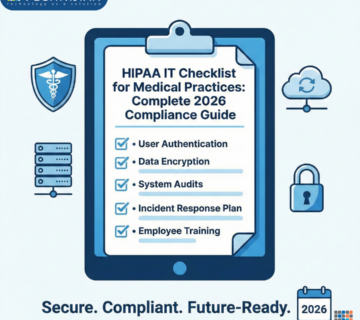
The 2026 HIPAA Compliance Checklist for OC
This is organized by rule so you can work through each area systematically. Some items will take an afternoon to verify. Others represent genuine projects. Utilize it to determine your current position.
Privacy Rule: What You Need to Have in Order
The Privacy Rule covers how your practice handles patient information in all its forms — paper charts, phone conversations, fax transmissions, digital records. The requirements here tend to feel more administrative than technical, but they are enforced just as seriously.
Your Notice of Privacy Practices needs to be current. Patients should receive it when they first come in, and it should be posted somewhere visible in your office as well as on your website. Crucially, it should reflect how your practice actually operates today — not how it operated when the document was first written in 2005.
Beyond the NPP, patients have specific rights under the Privacy Rule, and your practice needs working processes for honoring each of them. That includes requests to access their records, requests to amend information they believe is incorrect, and requests to know who has seen their information. If someone on your staff would not know what to do if a patient made one of these requests, that is a gap worth addressing.
The Minimum Necessary Standard is another area that gets practices in trouble. The idea is that staff should only access the information they actually need to do their job. A billing coordinator does not need to see detailed clinical notes. A receptionist does not need access to lab results. Putting access controls in place and actually enforcing them takes some ongoing effort, but the alternative is giving investigators an easy target.
You also need a designated Privacy Officer. This can be an existing staff member — it does not need to be a full-time role — but someone needs to own privacy issues, respond to patient complaints, and serve as the point of contact. That person and their contact information should be documented.
Security Rule: Administrative Safeguards
The Security Rule is where most practices have the most significant gaps, and the administrative safeguards section is where OCR tends to start when it opens an investigation.
The risk analysis is the centerpiece of everything. This is a formal, documented assessment of where ePHI lives in your environment, what threats exist, how likely those threats are, and what the potential impact would be if something went wrong. It is not a checklist you fill out once and file away. It is a living document that needs to be updated when things change — new software, a new office location, staff working from home, new vendors, anything that changes how information moves through your organization.
Paired with the risk analysis is a risk management plan. Once you have identified your risks, you need a documented plan for addressing them, with timelines and ownership assigned. The plan does not need to eliminate every risk, but you need to show that you are actively working through them.
Training is another area where the documentation requirement catches people off guard. Most practices do train their staff on HIPAA. The problem is that there is often no record of it. OCR wants to see who was trained, what they were trained on, and when. Get in the habit of documenting training completions with a sign-off from each employee.
Workforce access management means having a process for deciding who gets access to what, implementing that access appropriately when someone joins your organization, adjusting it when their role changes, and terminating it immediately when they leave. Departed employees whose accounts are still active is one of the most common security findings we see at practices across Orange County.
Every organization also needs a contingency plan—essentially a combination of a backup strategy and a disaster recovery plan—along with a formally designated security officer who is responsible for the program day to day.
Security Rule: Physical Safeguards
Physical safeguards address the environment where ePHI is stored and accessed. These requirements are sometimes treated as an afterthought, which is a mistake.
Server rooms and any areas where patient information is stored need controlled access. That means locked doors, key card or code-based entry, and a log of who accessed those areas and when. It does not require a sophisticated security system, but it does require something more than a door that anyone in the building can walk through.
Workstations that access ePHI need to be positioned so that patients in waiting areas or exam rooms cannot see what is on the screen. They need to lock automatically when not in use. And there need to be clear policies about what staff can and cannot do on those machines — policies that are actually communicated and enforced rather than written down and forgotten.
Device disposal is another overlooked area. When a computer, a tablet, a printer with an internal hard drive, or a USB drive reaches the end of its life, the data on it needs to be properly destroyed. Donating an old computer without wiping the drive first is a breach waiting to happen.
Security Rule: Technical Safeguards
This is where the cybersecurity requirements sit and where the gap between what practices have in place and what they actually need tends to be widest.
Every user who accesses systems containing ePHI should have their own unique login. Shared accounts — even among people who trust each other completely — make it impossible to audit who accessed what, which is itself a HIPAA problem. This applies to EHR systems, billing software, email, and anything else that touches patient data.
Multifactor authentication should be enabled everywhere it is supported. For most practices, that means email accounts, the EHR portal, any cloud-based systems, and remote access tools. A stolen password is much less damaging when a second factor is required to log in.
Encryption needs to be applied to patient data both when it is stored and when it is transmitted. Hard drives on computers and laptops that access ePHI should be encrypted. When information is sent over email or through any electronic channel, it needs to be encrypted in transit. This is not optional.
Automatic session timeouts should be configured on all devices. If a computer has been idle for a set period of time, it should require the user to log back in. The exact timeout period can vary based on your workflow, but it needs to be defined and implemented.
Audit logging means your systems should be recording who logged in, when, what records they accessed, and what they did. These logs need to be retained and reviewed periodically. If something goes wrong, these records are what allow you to figure out what happened, when it started, and how far it spread.
Keeping software updated sounds basic, but patch management is genuinely difficult to maintain consistently across a busy practice. Critical security patches should be applied within a reasonable timeframe — many compliance frameworks use 30 days as a benchmark. Vulnerabilities that sit unpatched for months are exactly the kind of thing ransomware operators exploit.
Business Associate Agreements
A Business Associate Agreement is the contract you are required to have in place with any outside vendor or service provider who has access to your patients’ protected health information. The requirement is not limited to obvious healthcare vendors. It covers your IT support company. Your billing service. Your transcription provider. Your cloud storage platform. Your document shredding company. Any software vendor who hosts data that includes PHI.
The first step is building an accurate inventory of everyone who falls into this category. Most practices, when they actually sit down and list all their vendors, find that the number is larger than they expected — and that they are missing BAAs for several of them.
Once you have the list, you need to verify that each relationship has a current, signed agreement. Agreements that were signed several years ago should be reviewed to make sure they reflect current regulatory expectations. Agreements that were never signed at all need to be addressed immediately.
One area that frequently gets missed is subcontractors. If you sign a BAA with a billing service, that billing service may use other vendors who also touch your data. Under HIPAA, those downstream relationships need to be covered as well.
Breach Notification
When a breach involving patient information happens — or when there is a reason to think one might have happened — there is a specific legal process that has to be followed, with hard deadlines attached.
Most practices do not find out whether they have a good breach response process until they actually need one. By then, it is too late to build one thoughtfully. The time to write an incident response plan, assign roles, and make sure your team knows what to do is before any incident occurs.
When you discover a potential breach, the immediate priorities are containing it, preserving whatever evidence exists, and getting your Privacy Officer involved quickly. From there, you need to conduct a breach risk assessment—a formal analysis of whether the incident qualifies as a reportable breach under HIPAA’s four-factor test. If it does, the clock starts on your notification obligations.
For breaches involving 500 or more individuals, you need to notify HHS immediately and, in most cases, local media. For smaller breaches, you log them and report the total annually. Individual notifications to affected patients must go out within 60 days of discovering the breach, regardless of size.
The documentation around this process matters enormously. Every incident, every assessment, every notification needs to be recorded. If you ever face an investigation, your breach log and the documented rationale for your reportability decisions will be closely scrutinized.
Documentation and Policies
One of the most consistent findings in HIPAA enforcement is that organizations did the right things but did not write them down. Good compliance practices that exist only in people’s heads do not satisfy OCR.
Your policies and procedures should cover every area the HIPAA rules address. They should be dated, versioned, and reviewed at minimum once a year. When something significant changes — a new system, a new office, a major workflow change — the relevant policies should be updated to match.
Training records, signed acknowledgments, risk analysis documents, vendor agreements, incident logs—all of it needs to be retained, organized, and accessible. HIPAA has a six-year documentation retention requirement for most records, though some items should be kept longer.
The goal is not to build a perfect compliance binder that nobody ever reads. The goal is to have documentation that accurately reflects how your organization actually operates, so that if you are ever asked to demonstrate your compliance program, the evidence is there.
Remote Work and Telehealth
The expansion of telehealth and remote work over the last several years created compliance gaps that many practices still have not fully closed. This section addresses the most common ones.
Any telehealth platform you use to see patients needs to be HIPAA-compliant, which means it needs to be specifically designed for healthcare use and covered by a signed BAA. Consumer video conferencing tools — the kind your family uses for holiday calls — do not meet this standard, even if they offer end-to-end encryption.
Staff who access patient information from home need to be doing so over a secure connection. A VPN that routes their traffic through your network is the standard approach. They should not be pulling up patient records over a coffee shop’s public WiFi or through a connection that has no security controls.
If employees are using their personal phones or laptops to access work systems, your organization needs a formal Bring Your Own Device policy that establishes minimum security requirements — things like requiring a passcode, enabling device encryption, and enrolling in a mobile device management solution that allows remote wipe if the device is lost or stolen.
Home office setups used for patient visits need at least a basic level of physical security. That means a private space where the conversation cannot be overheard, a screen that is not visible to others in the household, and a device that locks when not in use.
Where OC Practices Most Often Fall Short
After years of working with healthcare organizations across Orange County, we have a clear picture of where compliance programs tend to break down.
The Risk Analysis is the single biggest gap. A significant number of practices have either never done one or completed one so long ago that it bears no resemblance to their current environment. This is the document OCR asks for first, and its absence signals to investigators that the rest of the compliance program is probably equally underdeveloped.
BAA coverage is the second most common problem. Practices know they need agreements with their major vendors but miss less obvious ones — the company that supports their phone system, the consultant who does occasional IT work, the software tool someone on the billing team started using without going through a formal procurement process.
Training records are another consistent gap. The training happened. Nobody wrote it down. There is nothing to show an investigator.
Unencrypted devices show up regularly in breach investigations. A laptop left in a car, a USB drive that falls out of a pocket — these incidents result in mandatory breach notifications that could have been avoided entirely if the devices had been encrypted.
Offboarding failures are underrated as a compliance risk. When an employee leaves, their accounts need to be deactivated that day. Not at the end of the week. Not when IT gets around to it. The same day. Former employees with active credentials represent a straightforward access control failure that is hard to explain to OCR.
Frequently Asked Questions
Who exactly has to comply with HIPAA, and does that include small practices?
Any healthcare provider who transmits health information electronically — which includes sending claims to insurance companies — is a covered entity under HIPAA and must comply with all applicable rules. Size does not matter. A solo physician seeing 200 patients a month has the same compliance obligations as a 500-bed hospital. In fact, OCR has explicitly increased its focus on smaller providers because they tend to have less mature compliance programs and are seen as productive enforcement targets.
How do you define Protected Health Information?
PHI is any information that could be used to identify a patient and that relates to their past, present, or future health condition, the provision of healthcare to them, or the payment for that care. This is intentionally broad. A name combined with a date of appointment is PHI. An email address in your patient management system is PHI. A photo taken during a clinical visit is PHI. When in doubt, treat information as protected.
What actually happens when OCR investigates a covered entity?
Investigations typically begin one of two ways — either a patient files a complaint, or a covered entity self-reports a breach. OCR sends a request for documentation that usually includes your Risk Analysis, your policies, your training records, and your BAAs. If the initial review raises concerns, the investigation deepens. OCR can conduct on-site visits, interview staff, and review system logs. Investigations can result in no action, a corrective action plan, a resolution agreement with a financial settlement, or civil monetary penalties.
How much can a HIPAA violation actually cost?
The penalty structure has four tiers based on how culpable the organization is. At the bottom, violations the organization genuinely could not have known about carry minimum penalties of $100 per violation. At the top, willful neglect that the organization did not bother correcting carries a minimum of $50,000 per violation, with annual caps per category reaching $1.9 million. Beyond civil penalties, egregious violations can result in criminal referrals with potential prison sentences. The more significant practical cost, in many cases, is the reputational damage and the cost of remediation that follows an investigation.
Is a BAA enough to make a vendor relationship HIPAA-compliant?
A BAA is necessary but not sufficient. The agreement documents the vendor’s obligations, but it does not verify that the vendor is actually meeting them. You should also conduct at least a basic security review of any vendor before giving them access to PHI — asking about their security certifications, their breach history, how they encrypt data, and whether they have their own compliance program. Outsourcing work to a vendor does not outsource your compliance responsibility.
What should we do on the day we discover a potential breach?
Stop what you are doing and contain the situation first. If a system is actively compromised, isolate it from your network. If a device was stolen, remotely wipe it if you have that capability. Do not delete anything — preserve whatever evidence exists. Get your Privacy Officer and, if you have one, your IT security contact involved immediately. Start documenting everything from that moment forward: what you knew, when you knew it, what you did in response. Then begin your Breach Risk Assessment to determine whether the incident needs to be reported and to whom.
Does using a HIPAA-compliant cloud platform automatically make our data compliant?
No, and this misunderstanding causes real problems. A cloud platform that advertises HIPAA compliance means it has the capability to support a compliant deployment — it does not mean every customer’s deployment is automatically compliant. You still need to configure the platform correctly, enable the right security features, execute a BAA with the provider, restrict access appropriately, and train your staff on proper use. The platform gives you the tools. Using them correctly is your responsibility.
We are a small practice with limited IT resources. Where do we start?
Start with a current Risk Analysis. Everything else in your compliance program flows from understanding where your actual risks are. Many smaller practices try to build out policies and procedures before doing the risk assessment, which means they are writing to a generic template rather than to their specific situation. Get the risk analysis done first — even a straightforward one conducted honestly is more valuable than elaborate documentation that does not reflect reality. From there, address your highest-risk findings first and work down.
How does California law interact with HIPAA for OC practices?
California has its own health information privacy laws, and where California’s requirements are stricter than federal HIPAA, California law applies. The Confidentiality of Medical Information Act, for example, covers a broader range of entities than HIPAA does and imposes specific requirements around employee health information and the use of patient data for marketing purposes. The CCPA intersects with HIPAA in complex ways for business associate relationships. Orange County practices need to be aware of both frameworks and, when they conflict, default to whichever is more protective of patient rights.
How do we prove our compliance if OCR asks?
You prove it with documentation. Every decision you made, every control you implemented, every training session you ran needs a paper trail. Investigators cannot verify verbal commitments or good intentions. If you conducted a Risk Analysis but did not write it up formally, it might as well not exist from an enforcement standpoint. If you trained your staff but have no attendance records, there is nothing to show. Build the habit of documenting compliance activities as you complete them, not after the fact.
How Technijian Can Help
Technijian has been working with Orange County businesses on their technology and compliance programs since 2000. Our founder Ravi Jain started the company in Irvine, and most of our team has been in the Southern California healthcare IT space for a long time. We are not a large national firm that treats OC as one territory among many — the organizations we work with are the same ones we run into at local business events, and their success matters to us in a direct way.
Our work with healthcare clients starts with a thorough look at where things actually stand. We have seen enough HIPAA programs across enough practice types to know that the gap between what organizations think their compliance looks like and what it actually looks like is often significant. A lot of that gap is not because anyone was negligent — it is because HIPAA is genuinely complex, the requirements evolve, and most clinical staff are focused on patient care, not regulatory documentation.
The 2026 HIPAA Compliance Checklist for OC is something we use as a starting framework with new clients. It gives everyone a shared picture of what needs to be addressed and in what order. From there, the work gets specific to your organization — your systems, your vendor relationships, your workflows, your staff.
On the technical side, we handle the implementation of the controls that the Security Rule requires. That includes configuring MFA across your systems, setting up encryption on devices and in transit, deploying endpoint security tools, building out audit logging, and making sure your remote access setup does not create the kind of exposure we described earlier in this post. These are not one-time projects — we also provide ongoing monitoring so that new devices, new accounts, and configuration changes do not quietly introduce compliance gaps over time.
For policies and documentation, we develop materials that reflect how your practice actually operates rather than using off-the-shelf templates that nobody reads. We handle the business associate agreement process from vendor identification through execution and ongoing management. We run training programs that work for clinical and administrative staff who have limited time and no patience for hour-long compliance lectures.
When incidents happen — and at some point, something will happen — we handle the response. Our team conducts the forensic investigation, completes the breach risk assessment, and guides the notification process from start to finish. Having that capability in place before you need it is one of the most valuable things a practice can do.
We work with organizations throughout Orange County—Irvine, Anaheim, Santa Ana, Costa Mesa, Huntington Beach, Newport Beach, Fullerton, Garden Grove, Laguna Beach, and everywhere in between. Our clients include physician group practices, dental offices, behavioral health providers, physical therapy clinics, medical billing operations, and technology companies that serve the healthcare sector. If your organization touches patient health information and operates in Southern California, we know the regulatory environment you are working in.
Book a Compliance Consultation
If you have read through this post and found yourself identifying gaps in your current program, the next step is a conversation. We offer a free, no-commitment HIPAA compliance consultation where we take a practical look at where your organization stands and what it would take to get fully current.
There is no sales pitch. If you are in good shape, we will tell you that. If you have work to do, we will give you an honest picture of what that looks like and what it costs. Our goal is to be useful, and that starts with giving you an accurate read on your situation.
📞 Call us: (949)-379-8500 🌐 Visit: technijian.com 📍 Irvine, CA — Serving Orange County and Southern California