New ClickFix Malware Campaign Exploits Windows App-V Scripts to Deploy Infostealer
🎙️ Dive Deeper with Our Podcast!
Cybersecurity researchers have identified a sophisticated malware distribution campaign that combines social engineering tactics with legitimate Windows components to deliver the Amatera information-stealing malware. This attack methodology represents an evolution in how cybercriminals exploit trusted system tools to bypass security defenses and compromise user systems.
The attack chain leverages Microsoft Application Virtualization scripts alongside deceptive CAPTCHA verification pages, creating a multi-layered threat that targets both technical vulnerabilities and human psychology. Understanding how these attacks work and implementing proper defensive measures has become critical for organizations and individuals alike.
Understanding the ClickFix Attack Method
The ClickFix technique has gained notoriety among threat actors for its effectiveness in tricking users into executing malicious commands. Rather than relying on traditional malware delivery methods like infected email attachments or drive-by downloads, ClickFix attacks manipulate users into manually running harmful code on their own systems.
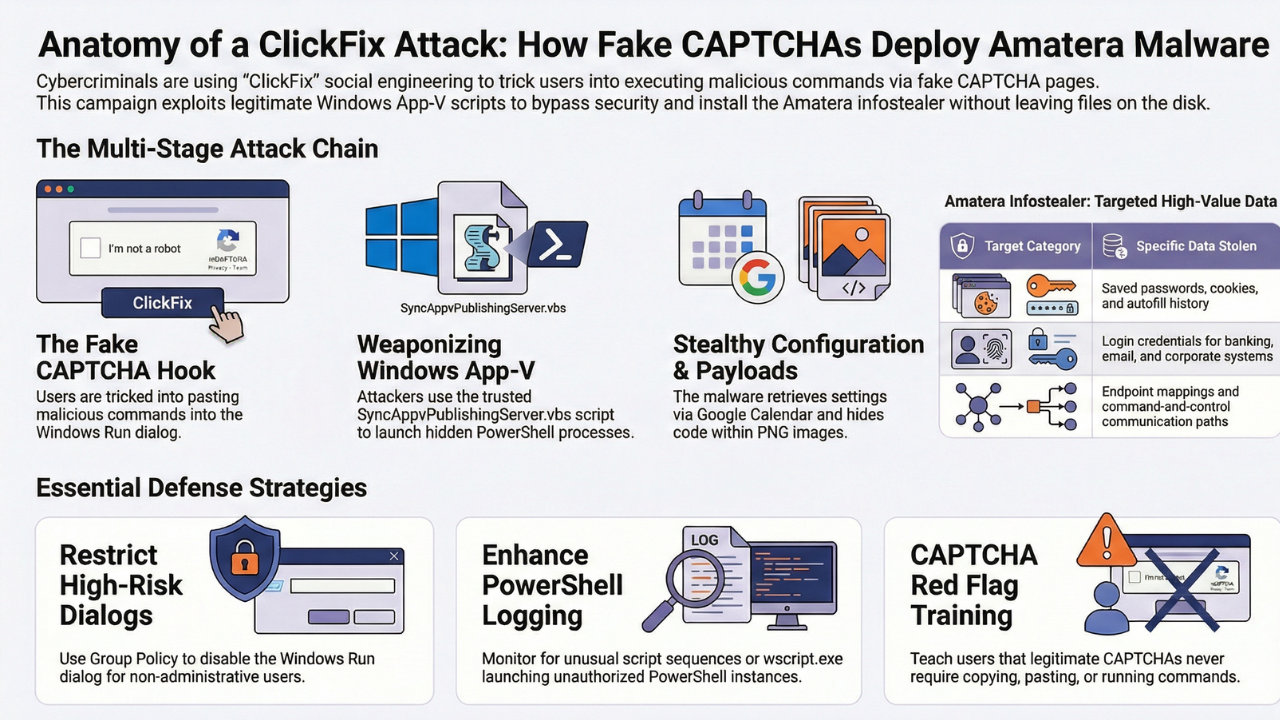
This latest campaign begins when victims encounter what appears to be a standard CAPTCHA human verification page. These fake verification screens have become increasingly convincing, mimicking the design patterns of legitimate security checks that users encounter daily across the internet.
The fraudulent page instructs users to copy and paste a specific command into the Windows Run dialog. This social engineering tactic exploits user trust in CAPTCHA systems while bypassing traditional security tools that scan for malicious files or network traffic.
The Role of Windows App-V in This Campaign
What makes this campaign particularly concerning is its abuse of Microsoft Application Virtualization technology. App-V is an enterprise feature designed to run applications in isolated virtual environments without requiring full system installation. Organizations use this technology to streamline software deployment and manage applications across their networks.
Attackers have weaponized the SyncAppvPublishingServer.vbs script, a legitimate component used for publishing and managing virtualized applications. This script operates as what security professionals call a living-off-the-land binary, meaning it leverages existing, trusted system tools to perform malicious actions.
When executed through the trusted wscript.exe binary, the App-V script launches PowerShell in a way that appears legitimate to security monitoring tools. This technique helps the malware evade detection by disguising malicious activity as normal system operations.
 How the Attack Chain Unfolds
Initial Verification and Anti-Analysis Measures
During the initial execution stage, the malicious command performs several verification checks to ensure it runs in a genuine user environment rather than a security research sandbox. The script verifies that the user executed the command manually, confirms the execution sequence proceeded as expected, and checks that clipboard contents remained unchanged.
These sophisticated anti-analysis techniques help the malware avoid detection by automated security systems. When the script detects it might be running in an analysis environment, it enters an infinite wait state, potentially exhausting automated analysis resources without revealing its true capabilities.
Configuration Retrieval Through Google Calendar
Once the initial checks pass, the malware demonstrates remarkable ingenuity by retrieving its configuration from a public Google Calendar file. Attackers encode configuration values in base64 format and embed them within specific calendar events. This technique provides several advantages for threat actors.
Using Google Calendar for command and control infrastructure allows attackers to hide malicious communications within legitimate, encrypted HTTPS traffic to trusted Google servers. This makes detection significantly more challenging for network security tools that might otherwise flag suspicious domains or IP addresses.
Payload Deployment and Steganography
As the attack progresses, the malware spawns a hidden 32-bit PowerShell process through the Windows Management Instrumentation framework. Multiple embedded payloads are then decrypted and loaded directly into system memory, avoiding detection methods that scan for malicious files on disk.
The campaign employs steganography to further conceal malicious code. Attackers embed encrypted PowerShell payloads within seemingly innocuous PNG images hosted on public content delivery networks. These images appear normal to casual inspection, but contain hidden malicious code extracted through least significant bit steganography techniques.
The malware dynamically retrieves these steganographic images using resolved WinINet APIs, extracts the hidden payload data, decrypts it, decompresses it using GZip, and executes everything entirely in memory. This fileless approach makes forensic analysis difficult and helps the malware maintain persistence while evading traditional antivirus solutions.
The Amatera Infostealer Threat
The final payload in this attack chain is Amatera, a sophisticated information-stealing malware that has evolved significantly since its initial appearance. Built upon code from the ACR infostealer, Amatera represents an ongoing development effort that has resulted in increasingly capable versions.
Once active on a compromised system, Amatera establishes communication with its command and control server using a hardcoded IP address. The malware retrieves endpoint mappings and awaits additional binary payloads delivered through HTTP POST requests, providing operators with flexible control over infected systems.
Amatera functions as a standard information stealer, targeting browser data including saved passwords, cookies, and autofill information. The malware can harvest credentials from popular web browsers, potentially giving attackers access to email accounts, banking portals, social media profiles, and corporate systems.
The malware is available through a malware-as-a-service model, allowing cybercriminals with limited technical expertise to deploy sophisticated attacks. This business model has contributed to the widespread distribution of Amatera and its continuous improvement as developers add new features and evasion techniques.
Protecting Your Organization Against ClickFix Attacks
Administrative Controls and Policy Enforcement
Organizations should implement Group Policy settings to restrict access to the Windows Run dialog for users who do not require it for their daily work. This preventive measure eliminates one of the primary attack vectors used in ClickFix campaigns.
IT administrators should evaluate whether Application Virtualization components are necessary for their environment. If App-V is not actively used, removing these components reduces the attack surface and eliminates the specific vector exploited in this campaign.
Enhanced Monitoring and Logging
Enabling comprehensive PowerShell logging provides visibility into script execution across your network. Security teams can analyze these logs to identify suspicious patterns, such as unusual script execution sequences or commands that match known attack indicators.
Organizations should implement monitoring for outbound network connections that exhibit mismatches between HTTP Host headers or TLS Server Name Indication fields and destination IP addresses. These inconsistencies often indicate malware attempting to hide its communication with command and control servers.
User Education and Awareness Training
Regular security awareness training remains crucial in defending against social engineering attacks. Employees should understand the risks associated with copying and pasting commands from web pages, even when those pages appear legitimate.
Training programs should include specific examples of ClickFix attacks and explain how to recognize suspicious CAPTCHA pages. Users should know to report unusual verification requests to their IT security team rather than following instructions that seem questionable.
Technical Security Measures
Deploy endpoint detection and response solutions that can identify and block suspicious PowerShell activity, especially when launched through uncommon parent processes like wscript.exe. These tools provide real-time protection against fileless malware techniques.
Implement application control policies that restrict script execution to approved directories and signed scripts. This approach prevents unauthorized scripts from running even if users are tricked into copying malicious commands.
Frequently Asked Questions
What is a ClickFix attack and how does it work?
A ClickFix attack is a social engineering technique where cybercriminals create fake verification pages that trick users into manually copying and executing malicious commands on their computers. These attacks typically use convincing CAPTCHA-style interfaces to appear legitimate. Unlike traditional malware that requires users to download infected files, ClickFix attacks manipulate users into running harmful code through trusted system interfaces like the Windows Run dialog.
Why is Windows App-V being targeted by attackers?
Windows Application Virtualization components are targeted because they are legitimate Microsoft tools that security systems inherently trust. The SyncAppvPublishingServer.vbs script can launch PowerShell processes in ways that appear normal to monitoring tools. This living-off-the-land technique allows attackers to hide malicious activity within legitimate system operations, making detection significantly more difficult for traditional security solutions.
What data does the Amatera infostealer target?
Amatera primarily focuses on harvesting browser data and credentials from infected systems. This includes saved passwords, authentication cookies, autofill information, browsing history, and login credentials stored in popular web browsers. The stolen information can provide attackers with unauthorized access to email accounts, banking portals, corporate systems, and other sensitive services where victims have saved login credentials.
How can I tell if a CAPTCHA page is legitimate or fake?
Legitimate CAPTCHA systems never ask users to copy and paste commands, run scripts, or execute code in system dialogs. Real verification checks only require clicking checkboxes, selecting images, or typing displayed characters. Be immediately suspicious of any verification page that provides text to copy or instructs you to open Windows Run, Command Prompt, or PowerShell. When encountering suspicious verification requests, close the page and access the intended website directly through a new browser tab.
What should I do if I accidentally executed a ClickFix command?
If you suspect you have executed a malicious command, immediately disconnect your computer from the network to prevent data exfiltration. Contact your IT security team or a cybersecurity professional right away. Change passwords for all important accounts from a different, uncompromised device. Run a comprehensive antivirus scan and consider performing a full system restore or reinstallation. Monitor your financial accounts and enable multi-factor authentication on all services where possible.
Can traditional antivirus software detect these attacks?
Traditional antivirus software often struggles to detect ClickFix attacks because they use legitimate system tools and execute entirely in memory without creating suspicious files on disk. The malware leverages trusted Microsoft components and employs advanced evasion techniques like steganography. Organizations need modern endpoint detection and response solutions that can identify suspicious behavior patterns, monitor PowerShell activity, and detect anomalous network communications to effectively defend against these sophisticated threats.
How Technijian Can Help
Defending against sophisticated malware campaigns like ClickFix attacks requires comprehensive security expertise and proactive monitoring. Technijian specializes in protecting businesses from evolving cyber threats through customized security solutions designed for your specific needs.
Our cybersecurity team provides advanced threat detection and response services that identify suspicious activity before it compromises your systems. We implement multi-layered security architectures that include endpoint protection, network monitoring, and behavioral analysis specifically designed to catch living-off-the-land attacks that traditional antivirus solutions miss.
Technijian offers comprehensive security assessments that evaluate your current defenses against modern attack vectors. Our experts analyze your IT environment to identify vulnerabilities, recommend appropriate controls, and implement Group Policy configurations that restrict access to high-risk system tools like the Windows Run dialog and PowerShell.
We deploy enterprise-grade monitoring solutions with advanced logging capabilities that track PowerShell execution, script activity, and suspicious network connections. Our security operations center provides continuous monitoring and rapid incident response, ensuring threats are detected and neutralized before they cause damage.
Beyond technical controls, Technijian delivers targeted security awareness training programs that educate your employees about social engineering tactics. Our training modules include specific examples of ClickFix attacks, helping your team recognize and report suspicious activity before following malicious instructions.
Our managed security services include regular system hardening, where we evaluate and remove unnecessary components like unused Application Virtualization tools that could provide attack vectors. We implement application control policies, maintain up-to-date threat intelligence, and continuously adapt your defenses as new attack techniques emerge.
If your organization experiences a security incident, Technijian provides expert forensic analysis and incident response services. Our team can quickly determine the scope of a compromise, contain the threat, remediate affected systems, and implement measures to prevent similar attacks in the future.
Contact Technijian today to schedule a security consultation. Our experienced professionals will assess your current security posture, identify gaps in your defenses, and develop a customized protection strategy that safeguards your business against ClickFix attacks and other sophisticated cyber threats. Don’t wait until after an attack to secure your systems—partner with Technijian to build robust defenses that keep your organization safe.
About Technijian
Technijian is a premier managed IT services provider in Irvine, specializing in delivering secure, scalable, and innovative AI, SEO, and technology solutions across Orange County and Southern California. Founded in 2000 by Ravi Jain, what started as a one-man IT shop has evolved into a trusted technology partner with teams of engineers, AI specialists, cybersecurity professionals, and digital marketing experts both in the U.S. and internationally.
Headquartered in Irvine, we provide comprehensive cybersecurity solutions, IT support, AI implementation services, cloud services, and search engine optimization (SEO) and digital visibility solutions throughout Orange County—from Aliso Viejo, Anaheim, Costa Mesa, and Fountain Valley to Newport Beach, Santa Ana, Tustin, and beyond. Our extensive experience with enterprise telecommunications and security deployments, combined with our expertise in SEO-driven growth strategies and our deep understanding of local business needs, makes us the ideal partner for organizations seeking solutions that deliver real protection, online visibility, and operational efficiency.
We work closely with clients across diverse industries, including healthcare, finance, law, retail, and professional services, to design integrated technology and SEO strategies that reduce risk, enhance productivity, improve search rankings, and strengthen digital presence while maintaining the highest protection standards. Our Irvine-based office remains our primary hub, delivering the personalized service and responsive support that businesses across Orange County have relied on for over two decades.
With expertise spanning cybersecurity, managed IT services, telecommunications, AI implementation, SEO and digital marketing, consulting, and cloud solutions, Technijian has become the go-to partner for small to medium businesses seeking reliable technology infrastructure and measurable online growth. Whether you need 3CX deployment in Irvine, telecommunications optimization in Santa Ana, IT consulting in Anaheim, or SEO services to increase visibility and lead generation, we deliver solutions that align with your business goals and operational requirements.
Partner with Technijian and experience the difference of a local IT company that combines global technology expertise, SEO-driven growth, and community-focused service. Our mission is to help businesses across Irvine, Orange County, and Southern California harness the power of advanced technology and digital marketing to stay protected, visible, efficient, and competitive in today’s digital world.