Is 24/7 IT Support Worth It for SMBs? Here’s the Real ROI
🎙️ Dive Deeper with Our Podcast!
The Real ROI of 24/7 IT Support for SMBs
Is 24/7 IT Support Worth It for SMBs? The Real ROI Explained
For small and mid-sized businesses, IT issues don’t wait for business hours. Downtime, security threats, and system failures after hours can lead to lost revenue, reduced productivity, damaged reputation, and serious compliance risks. This article breaks down the real return on investment (ROI) of 24/7 IT support, showing how proactive monitoring, rapid incident response, and continuous security can prevent costly disruptions before they escalate.
Through real-world scenarios—such as ransomware attacks, failed backups, and extended downtime—the guide demonstrates how round-the-clock IT support often pays for itself by avoiding just one major incident per year. Beyond cost savings, businesses gain peace of mind, improved employee satisfaction, stronger security, and the reliability needed to scale and stay competitive.
For SMBs, especially those handling sensitive data or generating revenue outside standard hours, 24/7 IT support isn’t just an expense—it’s a strategic investment in stability, growth, and long-term success.
Running a small or medium-sized business in Orange County means juggling countless priorities—from managing your team to serving customers and growing your bottom line. But when your systems go down at 9 PM or a security threat emerges over the weekend, can your business afford to wait until Monday morning for help?
For many SMBs, the question isn’t whether they need IT support—it’s whether investing in round-the-clock coverage actually delivers measurable returns. The short answer? Absolutely. But the real value goes far beyond just having someone to call when things break.
In this comprehensive guide, we’ll break down the true ROI of 24/7 IT support services, examine what sets always-available support apart from traditional 9-to-5 solutions, and help you determine whether your business needs this level of coverage. Whether you’re searching for “IT support near me” or evaluating business IT support in Orange County, understanding these economics can transform how you approach technology management.
The Hidden Costs of Downtime: Why Every Minute Matters
Before we calculate ROI, let’s establish what’s at stake when your technology fails and no one’s available to fix it.
Immediate Financial Losses
When your systems go offline, revenue stops flowing. For businesses that process transactions digitally, accept online orders, or rely on customer-facing applications, every hour of downtime translates directly to lost sales. Research from Gartner indicates that the average cost of IT downtime is $5,600 per minute—that’s over $300,000 per hour for many organizations.
Even if your business doesn’t operate 24/7, your systems do. Email servers, backup processes, security monitoring, and cloud applications run continuously. A failure at 2 AM that isn’t addressed until 8 AM represents six hours of compounding problems, data loss risks, and security vulnerabilities.
Employee Productivity Destruction
Consider what happens when your team arrives Monday morning to find systems offline. Rather than starting their workday productively, employees spend hours unable to access files, communicate with clients, or complete their core responsibilities. If you have twenty employees earning an average of $30 per hour, just four hours of system downtime costs $2,400 in lost productivity—before accounting for the domino effect of missed deadlines and frustrated customers.
The productivity impact extends beyond the immediate outage. When employees can’t trust systems to work reliably, they develop workarounds, duplicate efforts, and waste time on manual processes that technology should handle automatically.
Customer Trust and Reputation Damage
In today’s always-connected world, customers expect businesses to be accessible and responsive. When they can’t access your services, reach your team, or complete transactions, they don’t wait patiently—they go to competitors who can serve them immediately.
Research shows that 39% of customers who experience technical issues with a business will share their negative experience with others. In the age of social media and online reviews, a single weekend of website downtime or email outages can generate lasting reputation damage that takes months to overcome.
Security Vulnerabilities and Compliance Risks
Cybercriminals don’t work business hours. In fact, many attacks are specifically timed for evenings and weekends when businesses are less likely to have IT staff monitoring their systems. The average time to detect a data breach is 207 days according to IBM’s Cost of a Data Breach Report. However, breaches that occur outside business hours often go undetected even longer because there’s no one watching security alerts.
For businesses in regulated industries—healthcare, finance, legal services, or any organization handling sensitive customer data—compliance requirements often mandate continuous monitoring and rapid incident response. Without 24/7 IT support services, you’re not just risking security breaches; you’re potentially violating regulatory obligations that carry significant penalties.
What 24/7 IT Support Actually Includes
Not all round-the-clock support is created equal. Understanding what comprehensive 24/7 IT support services should include helps you evaluate providers and calculate true value.
Proactive Monitoring and Maintenance
The most valuable aspect of 24/7 coverage isn’t just having someone available when problems occur—it’s preventing problems before they impact your business. Advanced IT support services utilize continuous monitoring tools that track system health, performance metrics, and potential issues across your entire technology infrastructure.
This includes monitoring server performance, network traffic, application availability, backup completion, security events, and storage capacity. When monitoring systems detect anomalies—a server showing early signs of hard drive failure, unusual network traffic patterns suggesting a security threat, or backup processes failing—IT professionals can address these issues before they escalate into emergencies.
Many problems that seem sudden actually develop gradually. A server that crashes Monday morning may have been showing warning signs all weekend. With 24/7 monitoring, these early indicators trigger alerts, and technicians resolve the underlying issue before it causes downtime.
Immediate Incident Response
When problems do occur, response time determines impact. A compromised user account discovered at 7 PM can be immediately disabled by 24/7 support staff, preventing the attacker from exfiltrating data overnight. A failed backup process detected Sunday evening can be restarted before Monday’s business operations begin, ensuring data protection remains continuous.
Immediate response is particularly critical for security incidents. The first hours after a breach or ransomware infection determine whether the incident remains a minor security event or escalates into a business-catastrophic data loss scenario. IT support services with true 24/7 capabilities can isolate affected systems, contain threats, and begin remediation immediately rather than allowing problems to compound for hours.
Patch Management and Updates
Software updates and security patches need to be applied regularly, but these processes often require system restarts or can cause temporary service disruptions. With 24/7 IT support services, critical updates can be deployed during off-hours when they won’t interrupt business operations.
This approach delivers dual benefits: your systems remain secure and current while your team enjoys maximum uptime during working hours. Rather than scheduling maintenance windows that disrupt productivity, updates happen when your business is closed.
Help Desk Support for Extended Hours Operations
Many SMBs have employees who work outside traditional 9-to-5 schedules. Field technicians finishing documentation in the evening, sales professionals preparing presentations early morning, or customer service teams supporting clients across time zones all need reliable technology access.
Quality 24/7 IT support services provide help desk access for these users, ensuring that technical issues don’t prevent work regardless of when it occurs. This support might include password resets, application troubleshooting, connectivity issues, or access to specific resources.
Disaster Recovery and Business Continuity
Natural disasters, major system failures, and other catastrophic events don’t respect business hours. When disaster strikes, every minute of delay in initiating recovery processes extends downtime and increases data loss.
Business IT support in Orange County that includes 24/7 coverage ensures that disaster recovery processes can begin immediately. If an earthquake damages your data center at 4 AM Saturday, recovery operations start within minutes rather than waiting until Monday. This difference can mean hours versus days of total business disruption.
Calculating Real ROI: The Numbers That Matter
Let’s break down the actual financial impact of 24/7 IT support services using realistic scenarios common to Orange County SMBs.
Scenario One: The Ransomware Attack Avoided
A manufacturing company with forty employees experiences a suspicious email attachment opened by a staff member Friday evening. The attachment contains ransomware designed to encrypt company files and demand payment for decryption.
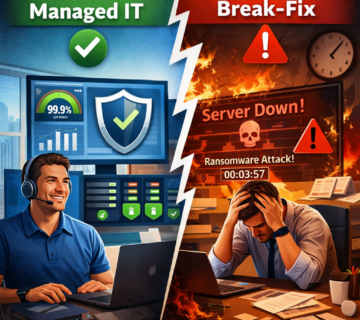
Without 24/7 IT Support:
- Attack occurs 6 PM Friday
- Ransomware encrypts files throughout weekend
- Problem discovered Monday 8 AM
- Business operations completely halted
- Average recovery time: 3-5 days
- Lost productivity: 40 employees × $35/hour × 32 hours = $44,800
- Lost revenue (unable to fulfill orders): $125,000
- Ransom payment (if paid): $50,000
- Forensic investigation and recovery: $25,000
- Customer notification and reputation management: $15,000
- Total cost: $259,800
With 24/7 IT Support Services:
- Attack detected by security monitoring within 15 minutes
- Compromised device immediately isolated from network
- Ransomware contained to single device
- Clean backup restored within one hour
- User educated on phishing identification
- Business operations unaffected Monday morning
- Cost: $0 direct loss + monthly IT support investment
- Total cost: Minimal impact
ROI calculation: Even if 24/7 IT support services cost $5,000 monthly ($60,000 annually), preventing just one ransomware incident saves $199,800 net—delivering 333% ROI from a single event.
Scenario Two: The Failed Backup Discovery
A professional services firm relies on automated backups running nightly. Unbeknownst to them, backup processes have been failing for three weeks due to insufficient storage space.
Without 24/7 Monitoring:
- Backup failures go undetected
- Server hardware failure occurs
- Team discovers three weeks of unbacked-up data is lost
- Critical client files, project work, and financial records gone
- Data reconstruction efforts: 200+ hours staff time = $30,000
- Client contract penalties for missed deadlines: $45,000
- Legal services for potential liability issues: $15,000
- Lost business from damaged reputation: $75,000
- Total cost: $165,000
With 24/7 IT Support Services:
- Monitoring alerts identify backup failure within hours of first occurrence
- Support team identifies storage issue and expands capacity
- All backups remain intact and verified
- Zero data loss
- Total cost: Minimal impact
ROI calculation: At $4,000 monthly for comprehensive IT support services ($48,000 annually), preventing this data loss scenario delivers $117,000 benefit—a 244% ROI.
Scenario Three: The Extended Downtime Event
An accounting firm experiences a critical server failure Thursday evening. Their primary file server, housing all client data and applications, experiences hardware failure.
Without 24/7 Support:
- Failure occurs 7 PM Thursday
- No monitoring alerts IT issues
- Problem discovered Friday 8 AM
- IT consultant contacted, arrives 11 AM
- Diagnosis: complete server failure requiring replacement
- Server parts ordered Friday, arrive Monday
- Installation and configuration: Monday-Tuesday
- Data restoration from backup: Tuesday-Wednesday
- Total downtime: 5 business days
- 15 employees idle: 15 × $45/hour × 40 hours = $27,000
- Rush hardware shipping charges: $2,000
- Emergency consultant rates: $8,000
- Missed tax filing deadlines (penalties): $12,000
- Client retention issues: $35,000
- Total cost: $84,000
With 24/7 IT Support Services:
- Server failure detected by monitoring immediately
- Alert triggers automatic response protocol
- Support team confirms failure remotely, orders replacement
- Temporary failover to cloud backup server activated
- Employees access files through temporary infrastructure Friday morning
- New hardware arrives Saturday, installed Saturday evening
- Primary systems restored Sunday
- Business operates normally Monday with minor performance impact only
- Full restoration Tuesday
- Total significant downtime: Less than 12 hours
- Total cost: Minimal productivity impact + monthly support investment
ROI calculation: Assuming $4,500 monthly IT support services ($54,000 annually), avoiding this $84,000 incident plus maintaining business continuity delivers immediate 156% ROI, not counting the preserved client relationships and reputation.
The Intangible Benefits That Multiply Value
Beyond direct cost avoidance, 24/7 IT support services deliver benefits that don’t appear on balance sheets but significantly impact business success.
Peace of Mind for Leadership
Business owners and executives carry enough stress without worrying whether their technology infrastructure will fail overnight. Knowing that qualified professionals are continuously monitoring systems, prepared to respond instantly to any issue, allows leadership to focus on strategic priorities rather than technical concerns.
This peace of mind has real value. Better sleep, reduced stress, and the ability to fully disconnect during personal time contribute to better decision-making and leadership effectiveness. When CEOs can take vacations without worrying about potential technology disasters, they return more refreshed and effective.
Competitive Advantage Through Reliability
In markets where competitors offer similar products or services, reliability becomes a differentiator. Businesses that maintain consistent uptime, respond promptly to customer needs, and never cite “technical difficulties” as excuses build reputations for dependability that translate to customer loyalty and premium pricing power.
Professional business IT support in Orange County enables this reliability. When your systems are always available, customers learn they can count on you—during normal business hours, late evenings, or weekends when they need urgent support.
Employee Satisfaction and Retention
Technology frustrations rank among the top workplace complaints. When employees consistently encounter IT problems that remain unresolved for extended periods, frustration builds. This affects morale, productivity, and ultimately retention.
Providing reliable IT support services—including access to help when employees work outside standard hours—demonstrates organizational commitment to employee success. Staff members feel supported, can work effectively regardless of schedule, and develop stronger engagement with the organization.
Scalability and Growth Enablement
As businesses grow, technology complexity increases exponentially. What worked for ten employees often fails at fifty. Growing organizations need IT infrastructure that scales reliably without creating new single points of failure.
Quality 24/7 IT support services include planning for growth, implementing scalable systems, and ensuring that expansion doesn’t compromise reliability. This enables businesses to pursue growth opportunities confidently rather than being constrained by technology limitations.
Regulatory Compliance and Risk Management
Many industries face regulations requiring specific security measures, data protection standards, and incident response capabilities. Continuous monitoring and 24/7 availability often aren’t optional—they’re compliance requirements.
Beyond avoiding penalties, robust IT support services reduce insurance costs. Cyber insurance providers increasingly require evidence of comprehensive security measures and incident response capabilities. Organizations with documented 24/7 monitoring and support often qualify for premium reductions that partially offset support costs.
Do You Actually Need 24/7 IT Support? Decision Framework
While the benefits are clear, 24/7 IT support services aren’t necessarily appropriate for every business. Consider these factors when evaluating your needs.
Business Operations and Revenue Model
If your business generates revenue outside traditional hours—through e-commerce, online bookings, digital services, or global operations—24/7 support isn’t optional. Any downtime directly impacts revenue. Even businesses that operate standard hours but process transactions digitally or rely on website leads need continuous availability.
Questions to ask:
- Do we generate revenue or leads outside business hours?
- Do customers expect 24/7 access to our services or information?
- Would after-hours system failures directly impact revenue?
- Do we have employees working varied schedules who need technology access?
Data Criticality and Compliance Requirements
Organizations handling sensitive data—medical records, financial information, legal documents, or personal customer data—face elevated risks from security breaches and data loss. The more critical your data, the less you can afford gaps in monitoring and protection.
Questions to ask:
- What’s the cost of losing one day of data?
- Do regulations require continuous security monitoring?
- Could a data breach threaten business viability?
- What’s our potential liability from security incidents?
Current IT Reliability and Risk Exposure
If you’re experiencing frequent issues, recurring problems, or have aging infrastructure, the risk of after-hours failures increases substantially. Conversely, businesses with brand-new, fully-redundant infrastructure might tolerate delayed response better (though still benefit from monitoring).
Questions to ask:
- How often do we experience IT problems?
- What’s the age and condition of our core infrastructure?
- Do we have single points of failure in critical systems?
- What’s happened when problems occurred after hours previously?
Growth Trajectory and Resource Availability
Fast-growing businesses often outpace their IT capabilities, creating increasing failure risks. Similarly, organizations without dedicated internal IT staff depend entirely on external support responsiveness.
Questions to ask:
- Are we growing rapidly?
- Do we have internal IT expertise available after hours?
- What’s our plan if major issues occur during weekends or holidays?
- Can leadership handle technical emergencies when they arise?
Cost-Benefit Analysis Specific to Your Business
Calculate the actual cost of downtime for your specific business. Multiply your average hourly revenue by typical downtime duration, add employee productivity losses, then compare this to annual IT support costs.
For most SMBs with revenues over $2 million annually, the break-even point occurs when 24/7 support prevents just one significant incident per year—a very conservative assumption given typical SMB downtime frequencies.
What to Look for in Quality IT Support Services
If you’ve determined that 24/7 coverage makes sense, selecting the right provider becomes critical. Not all IT support services deliver equivalent value.
True 24/7/365 Availability vs. Emergency-Only
Some providers advertise “24/7 support” but actually offer limited emergency response rather than comprehensive monitoring and support. Clarify exactly what coverage includes:
- Is monitoring truly continuous or only during business hours with emergency hotline after hours?
- What qualifies as an “emergency” for after-hours response?
- Are response times guaranteed for all issue types?
- Who responds—dedicated overnight staff or on-call technicians pulled from sleep?
Quality providers maintain dedicated teams across time zones or shifts, ensuring fresh, alert professionals handle your issues rather than exhausted on-call personnel.
Proactive vs. Reactive Support Philosophy
The most valuable IT support services emphasize prevention over repair. Evaluate whether potential providers focus on:
- Continuous monitoring and early problem detection
- Regular maintenance and optimization
- Strategic planning to prevent future issues
- Documentation and knowledge transfer
Reactive providers wait for things to break, then fix them. Proactive partners identify potential problems early, prevent outages before they occur, and continuously improve infrastructure reliability.
Local Knowledge and Accessibility
While remote monitoring and support handle most issues, certain problems require on-site presence. When searching for “IT support near me” or evaluating business IT support in Orange County, consider:
- Can providers reach your location quickly for urgent on-site needs?
- Do they understand local market conditions and common challenges?
- Are they familiar with your industry and regulatory environment?
- Can they meet face-to-face for planning and relationship building?
Local providers offer advantages for emergency hardware support, relationship development, and understanding regional business conditions.
Security Expertise and Compliance Knowledge
IT support increasingly means security management. Effective providers should demonstrate:
- Certifications in cybersecurity and compliance frameworks
- Experience with your industry’s regulatory requirements
- Advanced security monitoring and threat detection capabilities
- Documented incident response procedures
- Regular security training and awareness programs
Don’t assume all IT support services include robust security expertise. Explicitly evaluate security capabilities as a critical selection criterion.
Transparent Pricing and Service Level Agreements
Quality providers clearly define:
- Exactly what’s included in quoted prices
- Response time guarantees for different issue severities
- Escalation procedures when issues aren’t resolved promptly
- Performance metrics and regular reporting
- Terms for adding or modifying services
Avoid providers who can’t articulate clear service levels or whose pricing seems too good to be true—you often get what you pay for in IT support services.
Beyond 24/7: The Evolution Toward Managed IT Services
While 24/7 availability represents a significant upgrade from traditional break-fix IT support, many SMBs find even greater value in comprehensive managed IT services that include round-the-clock support as one component of a broader partnership.
Strategic Technology Planning
The best IT relationships extend beyond troubleshooting to strategic guidance. Managed services providers act as virtual CIOs, helping businesses:
- Align technology investments with business objectives
- Plan for growth and scalability
- Evaluate emerging technologies for competitive advantage
- Budget predictably for technology needs
- Avoid expensive mistakes from poor technology decisions
This strategic dimension transforms IT from a cost center to a business enabler.
Predictable Costs and Budget Management
Traditional break-fix IT support creates unpredictable expenses. You might spend $500 one month, then $8,000 the next when a server fails. This unpredictability complicates budgeting and can create financial strain.
Comprehensive managed services typically operate on fixed monthly fees covering all support, monitoring, maintenance, and often hardware lifecycle management. This predictability enables accurate budgeting and positions technology costs as controllable operating expenses rather than unpleasant surprises.
Complete Technology Lifecycle Management
Rather than addressing only immediate problems, managed services encompass your entire technology environment:
- Hardware procurement and deployment
- Software licensing and updates
- Network infrastructure management
- Cloud services integration
- Backup and disaster recovery
- Security and compliance
- User training and support
- Technology roadmap development
This comprehensive approach ensures all technology components work together effectively rather than creating integration headaches from piecemeal solutions.
Performance Optimization and Continuous Improvement
Beyond maintaining existing systems, quality managed services focus on continuously improving technology performance:
- Identifying bottlenecks and optimization opportunities
- Implementing automation to reduce manual work
- Upgrading systems proactively before they fail
- Measuring and reporting on technology metrics
- Regular business reviews to ensure IT aligns with evolving needs
This continuous improvement mindset delivers compounding value as your technology infrastructure becomes more efficient and reliable over time.
Making the Transition: Implementation Considerations
If you’ve decided to pursue 24/7 IT support services, successful implementation requires thoughtful planning.
Assessment and Documentation
Quality providers begin with comprehensive assessment of your current environment:
- Inventory all hardware, software, and network infrastructure
- Document existing configurations and customizations
- Identify immediate risks and vulnerabilities
- Assess backup and disaster recovery readiness
- Review security posture and compliance gaps
- Interview key stakeholders about pain points and priorities
This assessment establishes a baseline for monitoring improvement and ensures the provider understands your environment before taking responsibility.
Transition Planning and Minimal Disruption
Moving from your current IT support arrangement to new 24/7 services should enhance rather than disrupt operations. Look for providers who:
- Create detailed transition plans with clear milestones
- Schedule disruptive activities during off-hours
- Maintain communication throughout the process
- Provide training for your team on new procedures
- Establish clear escalation contacts
- Run parallel systems briefly during transition to ensure reliability
Poor transitions create precisely the downtime and problems you’re trying to avoid. Insist on careful planning.
Establishing Communication and Expectations
Successful IT partnerships require clear communication frameworks:
- How do users request support? (Portal, email, phone?)
- What response times can you expect for different priority levels?
- How will the provider communicate about ongoing issues?
- What regular reporting will you receive?
- Who’s your primary relationship contact?
- How often will you conduct business reviews?
Document these expectations formally in service level agreements, but also establish personal relationships that facilitate smooth collaboration.
Change Management and User Training
Your team needs to understand what’s changing and how to work with new support processes. Effective providers offer:
- Documentation of new procedures and contacts
- Training sessions for your staff
- Quick reference guides for common requests
- Support during transition period as users adapt
- Feedback mechanisms to improve processes
User adoption determines whether improved IT support translates to actual productivity benefits.
Frequently Asked Questions
How much does 24/7 IT support typically cost for small businesses?
Costs vary significantly based on business size, infrastructure complexity, and service scope. For SMBs with 10-50 employees, expect $3,000-$8,000 monthly for comprehensive 24/7 managed IT services including monitoring, support, security, backup, and strategic guidance. Some providers offer tiered pricing with 24/7 monitoring at lower price points and full support at premium levels. Per-user pricing typically ranges from $100-$200 per employee monthly. While this seems expensive, compare it to the cost of even one significant outage—most businesses find comprehensive support delivers substantial positive ROI.
What’s the difference between 24/7 support and regular business hours support?
Business hours support typically provides help desk access and scheduled maintenance Monday through Friday, 8 AM to 5 PM. Issues occurring outside these hours either go unaddressed until the next business day or incur expensive emergency service charges. In contrast, 24/7 IT support services include continuous monitoring, immediate incident response regardless of timing, off-hours maintenance and updates, and help desk availability evenings and weekends. The real difference isn’t just availability—it’s peace of mind knowing that problems are detected and resolved before they impact your business.
Can’t we just have our internal IT person handle after-hours emergencies on-call?
While possible, this approach creates several problems. First, even talented IT professionals can’t monitor systems while sleeping—automated monitoring with dedicated response teams detects issues much faster. Second, on-call arrangements create burnout, especially when emergencies repeatedly disrupt personal time. Third, complex problems often require specialized expertise beyond any single person’s capabilities. Quality 24/7 IT support services provide teams with diverse skills, eliminating single points of failure. Many businesses successfully combine internal IT staff for strategic initiatives and daily support with external 24/7 services for monitoring, after-hours coverage, and specialized expertise.
How quickly will someone respond to an after-hours emergency?
Response times should be clearly defined in service level agreements. For critical emergencies—complete system outages, security breaches, or data loss situations—expect initial response within 15-30 minutes including assessment and action initiation. Less urgent issues might have 2-4 hour response windows. Quality providers differentiate between acknowledgment (confirming they received your alert) and response (actively working on resolution). Ask potential providers for specific commitments and review their historical performance data. Also clarify whether “response” means remote troubleshooting, on-site presence, or both.
What happens if the IT support team can’t solve a problem remotely?
Comprehensive IT support services include escalation procedures for complex issues. This might involve engaging specialized vendors (for hardware repairs or software support), coordinating with application providers, or dispatching technicians for on-site diagnostics and repair. Quality providers maintain relationships with equipment vendors for expedited service and stock commonly-needed parts for rapid replacement. Your service agreement should specify maximum resolution times for various issue types and consequences if these aren’t met. For truly catastrophic failures, disaster recovery protocols ensure business continuity through alternative systems while primary infrastructure is repaired.
Do we really need monitoring if our systems seem stable?
Many businesses discover they have significant problems only after they’ve caused damage. Failing backups, security vulnerabilities, performance degradation, and impending hardware failures often show warning signs for days or weeks before creating visible problems. Continuous monitoring catches these early indicators, enabling proactive resolution. Think of it like monitoring vital signs versus waiting for symptoms of serious illness. Even with apparently stable systems, monitoring provides verification that everything’s actually functioning properly, backups are completing successfully, security systems are active, and no early warnings are developing. Most businesses that resist monitoring based on perceived stability discover multiple issues once monitoring is implemented.
How do you ensure the security of our data when giving access to an outside IT provider?
Professional IT support services treat security as fundamental responsibility. Look for providers who implement rigorous security practices including encrypted remote access, multi-factor authentication requirements, principle of least privilege (technicians access only systems necessary for their role), comprehensive activity logging and auditing, background checks on all staff, NDAs and security policies, regular security training for technicians, and compliance certifications relevant to your industry. Reputable providers welcome security questions and readily provide documentation of their practices. Your data security depends heavily on provider trustworthiness—thorough due diligence is essential.
What’s included in “proactive maintenance” and how often does it happen?
Proactive maintenance encompasses several activities performed regularly to prevent problems. This typically includes applying security patches and software updates, checking and verifying backup completion, monitoring disk space and resource utilization, reviewing system logs for warning signs, testing disaster recovery procedures, optimizing database and application performance, inspecting hardware for early failure indicators, updating antivirus and security definitions, and reviewing user access for security compliance. Frequency varies by task—some occur continuously through monitoring, others weekly, monthly, or quarterly. Quality providers document all maintenance activities and report on them regularly so you understand the value being delivered.
Can we upgrade from business hours support to 24/7 coverage later?
Most providers offer this flexibility. In fact, many businesses start with comprehensive business hours support, experience the value of proactive management, then expand to 24/7 coverage once they recognize the additional benefits. Starting with monitoring-only 24/7 services provides much of the value at lower cost than full 24/7 support. You gain continuous problem detection and security surveillance while reserving after-hours hands-on support for truly critical issues. As your comfort with the provider relationship grows and you recognize specific after-hours needs, upgrading is typically straightforward. Discuss flexibility during initial provider selection.
What metrics should we track to measure ROI from IT support services?
Focus on both tangible and experiential metrics. Tangible measurements include system uptime percentage (aim for 99.9% or better), average time to resolve issues (should decrease substantially), number and duration of outages, backup success rates, security incidents and their severity, and help desk ticket volume and resolution times. Calculate the cost of avoided downtime using your specific revenue and productivity figures. Experiential metrics include employee satisfaction with technology, leadership peace of mind regarding technology risks, ability to focus on business growth versus IT firefighting, and customer feedback about service reliability. Quarterly reviews with your provider should present these metrics with trends over time.
Do we need our own backup systems if the IT provider handles backups?
This depends on your risk tolerance and data criticality. Quality IT support services implement robust backup systems as part of their offering, typically including on-site and off-site (cloud) backup with regular testing. However, some businesses in highly regulated industries or with extremely critical data maintain independent backup systems as additional insurance. This “belt and suspenders” approach costs more but provides ultimate protection. For most SMBs, professional backup management by qualified IT support services provides sufficient data protection. The key is ensuring backups are tested regularly—many businesses discover too late that their backups don’t actually work when needed.
What if we’re not satisfied with the IT support service?
Reputable providers offer trial periods (typically 30-90 days) allowing you to evaluate service quality with limited commitment. Service agreements should specify performance standards, consequences for not meeting them, and termination provisions if the relationship isn’t working. Warning signs of problematic providers include resistance to answering questions, unclear service definitions, no performance guarantees, or high-pressure sales tactics. The best relationships develop from transparency on both sides—clear communication about expectations, honest assessment when problems occur, and willingness to address issues constructively. Don’t hesitate to change providers if service quality doesn’t meet commitments, but give new relationships reasonable time to develop.
How Technijian Can Help
For over two decades, Technijian has provided comprehensive IT support services to Orange County businesses, combining local expertise with enterprise-grade technology solutions. Our 24/7 monitoring and support ensures your systems remain secure, reliable, and optimized around the clock.
Our Comprehensive Approach
We understand that effective IT support extends far beyond troubleshooting. Our managed services encompass your entire technology environment including:
- Proactive monitoring and early problem detection
- Immediate incident response 24/7/365
- Comprehensive cybersecurity protection
- Verified backup and disaster recovery systems
- Strategic technology planning aligned with your business goals
- Predictable fixed monthly pricing that simplifies budgeting
- A dedicated account team that knows your business
Local Presence with Global Capabilities
Based in Irvine and serving Southern California since 2000, we combine local accessibility for on-site needs with sophisticated remote capabilities for immediate response regardless of timing. Our team knows Orange County businesses, understands regional compliance requirements, and can reach your location quickly when physical presence is needed.
Proven ROI for SMBs
Our clients consistently report dramatic reductions in downtime, improved employee productivity, enhanced security posture, and most importantly—peace of mind that technology supports rather than hinders their business success. We measure our value by your outcomes, tracking system uptime, response times, issue resolution, and overall business impact.
Security-First Philosophy
In today’s threat landscape, IT support and cybersecurity are inseparable. Every service we provide incorporates security best practices from continuous threat monitoring and rapid incident response to regular security assessments and employee training. We help Orange County businesses meet compliance requirements for HIPAA, PCI-DSS, SOC 2, and other regulatory frameworks.
Getting Started is Simple
We begin every relationship with comprehensive assessment of your current environment, honest evaluation of risks and opportunities, and clear recommendations with transparent pricing. There’s no obligation for this initial consultation—we invest time understanding your business because the right technology relationship starts with genuine understanding of your needs.
Schedule Your Free IT Support Consultation
Let’s discuss whether 24/7 IT support makes sense for your specific business. We’ll review your current technology situation, identify potential vulnerabilities, explain how our services align with your needs, and provide clear pricing with no hidden fees or surprises.
Contact Technijian today to schedule your free consultation. Discover why Orange County businesses trust us to keep their technology running smoothly, securely, and reliably—24 hours a day, 365 days a year. Your business deserves IT support that works as hard as you do.
About Technijian
Technijian is a premier Managed IT Services provider in Irvine, specializing in delivering secure, scalable, and innovative AI and technology solutions across Orange County and Southern California. Founded in 2000 by Ravi Jain, what started as a one-man IT shop has evolved into a trusted technology partner with teams of engineers, AI specialists, and cybersecurity professionals both in the U.S. and internationally.
Headquartered in Irvine, we provide comprehensive cybersecurity solutions, IT support, AI implementation services, and cloud services throughout Orange County—from Aliso Viejo, Anaheim, Costa Mesa, and Fountain Valley to Newport Beach, Santa Ana, Tustin, and beyond. Our extensive experience with enterprise security deployments, combined with our deep understanding of local business needs, makes us the ideal partner for organizations seeking to implement security solutions that provide real protection.
We work closely with clients across diverse industries, including healthcare, finance, law, retail, and professional services, to design security strategies that reduce risk, enhance productivity, and maintain the highest protection standards. Our Irvine-based office remains our primary hub, delivering the personalized service and responsive support that businesses across Orange County have relied on for over two decades.
With expertise spanning cybersecurity, managed IT services, AI implementation, consulting, and cloud solutions, Technijian has become the go-to partner for small to medium businesses seeking reliable technology infrastructure and comprehensive security capabilities. Whether you need Cisco Umbrella deployment in Irvine, DNS security implementation in Santa Ana, or phishing prevention consulting in Anaheim, we deliver technology solutions that align with your business goals and security requirements.
Partner with Technijian and experience the difference of a local IT company that combines global security expertise with community-driven service. Our mission is to help businesses across Irvine, Orange County, and Southern California harness the power of advanced cybersecurity to stay protected, efficient, and competitive in today’s threat-filled digital world.