Managed IT Pricing in Orange County: What Businesses Actually Pay in 2026
🎙️ Dive Deeper with Our Podcast!
If you’re a business owner or operations manager in Orange County searching for managed IT services, you’ve probably noticed something frustrating: nobody wants to give you a straight answer about pricing.
You visit website after website, and they all say the same thing: “Contact us for a custom quote.” That’s helpful when you’re just trying to understand whether managed IT fits your budget.
Let’s change that. This guide gives you the real numbers Orange County businesses pay for managed IT services in 2026, what affects those costs, and how to evaluate whether you’re getting a fair deal.
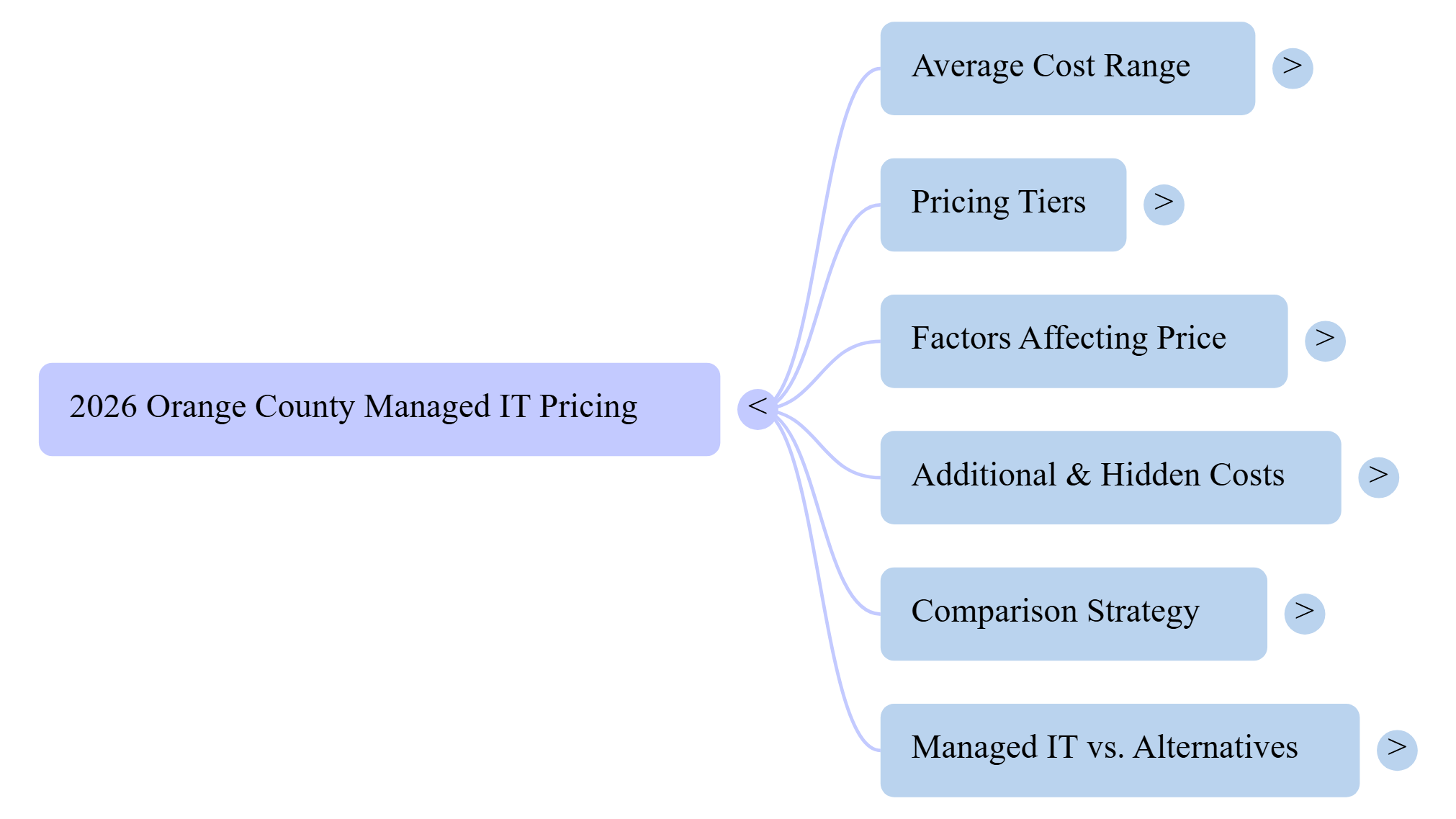
What Most Orange County Businesses Pay for Managed IT
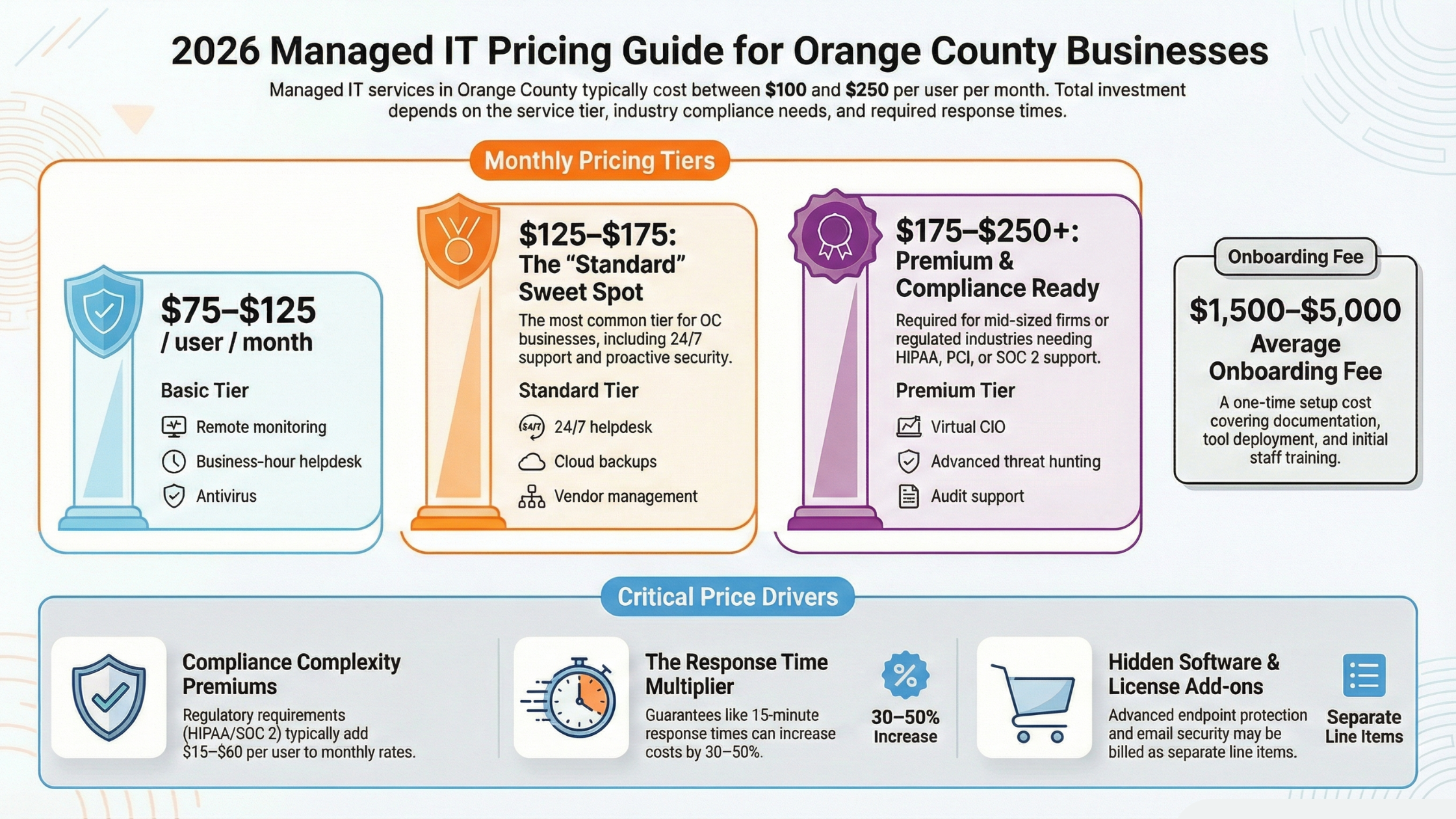
Here’s what you came for. Based on current market rates in Irvine, Anaheim, Santa Ana, Costa Mesa, Huntington Beach, and surrounding Orange County cities, most small to medium businesses pay between $100 and $250 per user per month for comprehensive managed IT services.
That’s a wide range, so let’s break it down further.
Pricing Tiers You’ll Encounter
Basic Managed IT ($75-$125 per user/month)
This entry-level tier typically covers remote monitoring and maintenance, basic helpdesk support during business hours, patch management for operating systems, antivirus management, and simple backup monitoring. Basic plans work for very small businesses with straightforward IT needs, perhaps a small retail shop or professional service firm with 5-10 employees who mainly use email and a few cloud applications.
Standard Managed IT ($125-$175 per user/month)
The standard tier is where most Orange County businesses land. This typically includes everything in basic plans plus 24/7 helpdesk support, proactive security monitoring, cloud backup with tested restores, vendor management for your internet, phone, and software providers, basic cybersecurity tools such as email filtering and web protection, and quarterly business reviews.
Premium Managed IT ($175-$250+ per user/month)
Premium plans add advanced capabilities that mid-sized businesses or compliance-focused industries need. These include advanced security operations with threat hunting, compliance documentation and audit support for HIPAA, PCI, SOC 2, a dedicated virtual CIO or IT strategist, priority response times often under 15 minutes, advanced endpoint detection and response, security awareness training for employees, and dark web monitoring for credential theft.
Real-World Examples
Consider a dental practice in Santa Ana with 12 employees. They need HIPAA compliance, so they’re looking at standard-to-premium pricing. At $150 per user per month, their monthly IT investment comes to $1,800, with setup costs potentially adding $2,000-5,000 in the first month.
A manufacturing company in Anaheim with 45 employees has more complex needs: multiple locations, specialized software, and uptime requirements. They might pay $135 per user for standard services plus additional charges for their specific applications, bringing their total to approximately $6,500 monthly.
A marketing agency in Costa Mesa with 8 employees keeping things simple might get by with a basic-plus plan at $110 per user, spending around $880 monthly on IT support.
 What Actually Affects Your Price
Not all businesses pay the same rate, even with similar employee counts. Here’s what moves the needle on pricing.
Company Size and Complexity
Larger companies often get better per-user pricing because the provider can spread fixed costs across more users. However, complexity can offset those savings. If you have multiple locations, complex networking requirements, or industry-specific software that needs specialized support, expect higher quotes.
A single-location accounting firm with 25 employees will typically pay less per user than a medical practice with 25 employees across three locations running specialized healthcare software.
Industry Compliance Requirements
Healthcare, legal, financial services, and any business handling sensitive data faces stricter requirements. These compliance needs require more documentation and specialized processes, which costs more to deliver.
HIPAA compliance for healthcare practices typically adds $25-50 per user monthly. PCI-DSS compliance for businesses processing credit cards adds $15-35 per user. SOC 2 requirements for tech companies or those handling client data adds $30-60 per user.
These aren’t arbitrary price increases. Compliance requires specific security controls, regular audits, documented policies, and trained staff to maintain. Your IT provider either builds these costs into their standard pricing or charges them separately.
Current State of Your IT Infrastructure
If your technology is outdated or poorly maintained, providers may charge more initially or require a “cleanup” project before standard managed services can begin. Conversely, if you’re running modern, well-documented systems, you’re less risky to support and may get better rates.
During their assessment, providers evaluate how old your computers and servers are, whether your network infrastructure meets current standards, what security measures you have in place, how well your systems are documented, and whether previous IT support left things in good order.
Service Level Requirements
Response time guarantees significantly affect pricing. There’s a substantial difference between “we’ll respond within 4 hours during business hours” and “we guarantee 15-minute response 24/7 with 4-hour resolution for critical issues.”
Standard SLAs typically include 1-4 hour response time during business hours, next-business-day for non-critical issues, and 4-8 hour response for after-hours emergencies. Premium SLAs offer 15-30 minute response around the clock, 4-hour resolution guarantees for critical issues, and dedicated support personnel who know your environment.
That premium response level might cost 30-50% more, but for businesses where downtime directly costs money, it’s often worth every dollar.
Hidden Costs to Watch For
The per-user price is just the starting point. Here’s where unexpected costs can appear.
Onboarding and Setup Fees
Most providers charge a one-time fee to properly onboard your business. This covers documenting your environment, setting up monitoring tools, migrating data if needed, and training your staff on new processes.
Expect $1,500-5,000 for most small businesses, or $5,000-15,000 for complex environments. Some providers waive this fee with longer contract commitments. Others spread it across your first year of service.
Projects and Upgrades
Your monthly fee covers day-to-day support and maintenance, but major projects are usually billed separately. Server replacements, office moves, new software implementations, and network upgrades typically fall outside your managed services agreement.
Ask providers specifically what’s included and what’s considered a “project.” Some include small projects up to 10-20 hours annually, while others charge for any work beyond routine maintenance.
Third-Party Software and Licenses
Your managed IT provider uses software tools to monitor your systems, manage backups, and provide security. Some providers include all tools in their pricing, while others charge separately for certain components.
Common add-ons that may be billed separately include advanced endpoint protection at $3-8 per device monthly, security awareness training at $2-5 per user monthly, advanced email security at $3-6 per user monthly, and cloud backup storage beyond basic allocations at $0.10-0.30 per GB.
Emergency and After-Hours Support
Basic plans often exclude 24/7 support or charge premium rates for after-hours calls. If your business operates outside standard hours or can’t afford weekend downtime, ensure around-the-clock support is included in your quote.
Some providers charge 1.5x to 2x their normal rates for after-hours support. Others include it but require you to purchase a minimum service tier.
How to Compare Quotes Fairly
When you get quotes from multiple providers, comparing them accurately is tricky because everyone packages services differently. Here’s how to make fair comparisons.
Create Your Requirements List First
Before talking to providers, document what you need. Consider how many employees you have, including remote workers. List the locations you operate from. Note any compliance requirements like HIPAA or PCI. Identify your current software and systems. Think about your biggest IT pain points. Define your acceptable response time for issues.
When you give each provider the same requirements, you’ll get more comparable quotes.
Ask for Detailed Line Items
Request quotes that break down exactly what’s included. A $150 per user quote that includes everything is better than a $125 per user quote with $40 in add-ons you’ll definitely need.
Your quote breakdown should show base managed services per user, security tools and licenses included, backup services and storage included, what’s considered included vs. project work, onboarding and setup costs, and contract terms and cancellation policies.
Understand the Contract Terms
Month-to-month flexibility usually costs more but provides peace of mind. Annual contracts often come with 10-15% discounts. Multi-year agreements might include even better rates plus price locks.
Watch for auto-renewal clauses, termination notice requirements, what happens to your data if you leave, and any early termination penalties.
Check References in Your Industry
A provider who’s great for retail businesses might not understand healthcare compliance. Ask for references from similar companies, ideally in your industry, your size range, and your geographic area.
Questions to ask references include how responsive the provider is during actual emergencies, what issues they’ve had and how they were resolved, whether prices increased significantly after the first year, and if they’d choose the same provider again.
The Real Cost of Cheap IT Support
We need to address why some quotes come in dramatically lower than market rates.
That provider quoting $75 per user when everyone else quotes $140 isn’t necessarily giving you a deal. They might be understaffed and slow to respond, using outdated or insufficient security tools, reactive instead of proactive in maintenance, inexperienced with businesses like yours, or planning to make up the difference with project billing.
We’ve seen Orange County businesses “save” $500 per month on IT support only to experience extended downtime that cost them $50,000 in lost productivity and emergency repairs. Ransomware incidents that better security would have prevented have cost businesses their entire operation.
The managed IT market has healthy competition, so when prices vary by more than 30-40% for similar services, something is different about what’s being offered.
When Managed IT Makes Financial Sense
Not every business needs full managed IT services. Here’s how to evaluate whether it’s right for you.
The Break-Even Calculation
A dedicated IT employee costs $70,000-100,000 annually in Orange County when you factor in salary, benefits, training, and tools. That’s roughly $6,000-8,500 per month just for one person who still takes vacations, gets sick, and can’t know everything about every system.
Managed IT services for a 20-person company might cost $3,000-4,000 monthly, providing a full team’s expertise, 24/7 coverage, and no HR complications.
Signs You Need Managed IT
You might be ready for managed IT if you’re currently reacting to IT problems instead of preventing them, if your “computer person” handles IT part-time alongside other responsibilities, if you’ve experienced security scares or actual breaches, if compliance requirements are becoming more demanding, if your current IT support is slow or unreliable, or if you’re growing and your IT can’t keep up.
Signs You Might Not Need Full Managed IT
Full managed services might be overkill if you have fewer than five employees using only cloud software, if your team is technically savvy and can self-support basic issues, if you have very simple technology needs, or if your budget truly can’t support professional IT support.
In these cases, a break-fix provider or limited support plan might work, but understand you’re accepting more risk and responsibility.
What Good Managed IT Looks Like
Beyond pricing, here’s what separates excellent providers from mediocre ones.
Proactive vs. Reactive
Good providers prevent problems rather than just fixing them. They monitor your systems continuously and address issues before you notice them. They keep your software patched and updated. They run regular security assessments. They test your backups to ensure they actually work. They provide reporting on your IT health.
Business Partnership
The best providers understand your business, not just your technology. They recommend solutions that fit your actual needs. They help you plan for growth. They communicate in business terms, not just technical jargon. They’re available when you need strategic guidance.
Transparency
Quality providers explain what they’re doing and why. They provide clear documentation of your environment. They give honest assessments of problems. They don’t oversell services you don’t need. They acknowledge mistakes and fix them promptly.
Getting Started with Your Search
Here’s a practical approach to finding the right managed IT provider in Orange County.
Start by documenting your current situation. List your employees, locations, and technology. Identify your biggest pain points. Note any compliance requirements. Set your budget expectations.
Research three to five providers in your area. Look for those experienced with businesses like yours. Check their reviews and ask for references. Verify they have proper certifications and insurance.
Request detailed proposals based on your documented needs. Compare apples to apples by ensuring each proposal addresses the same requirements. Ask questions about anything unclear.
Make your decision based on value rather than just price. The cheapest option rarely provides the best long-term outcome.
 Why Orange County Businesses Choose Technijian
Since 2000, Technijian has provided managed IT services to businesses throughout Irvine, Anaheim, Santa Ana, Costa Mesa, Huntington Beach, and surrounding Orange County cities. Our clients typically choose us because we offer transparent pricing with no hidden fees. We specialize in their industry, whether healthcare, legal, financial services, or professional services. We provide truly local support from technicians who can be on-site when needed. We maintain a 15-minute average response time for support requests. We deliver proactive security and compliance expertise.
Frequently Asked Questions
What’s the average cost of managed IT services in Orange County?
Most Orange County businesses pay between $100 and $250 per user per month for managed IT services. The exact rate depends on your company size, industry compliance requirements, service level needs, and current IT infrastructure condition.
How is managed IT pricing calculated?
Managed IT pricing is typically calculated per user per month. This model scales with your business and includes support for all devices each user needs. Some providers also offer per-device pricing or flat monthly rates for very small businesses.
What’s included in managed IT services?
Standard managed IT services typically include helpdesk support, system monitoring, patch management, antivirus and basic security, backup monitoring, and vendor management. Premium plans add advanced security, compliance support, and strategic IT planning.
Are there additional costs beyond the monthly fee?
Yes, expect potential additional costs for initial onboarding and setup, major projects and upgrades, some third-party software licenses, and after-hours support if not included in your plan. Always ask for a detailed breakdown of what’s included versus billed separately.
How do I know if I’m getting a fair price?
Get quotes from three to five providers using the same requirements list. If most quotes cluster in a similar range and one is dramatically lower, investigate why. Check references from similar businesses. Ensure you’re comparing equivalent service levels.
What’s the difference between managed IT and break-fix support?
Break-fix support means you call when something breaks and pay per incident. Managed IT provides ongoing proactive support for a fixed monthly fee. Managed IT typically costs more monthly but prevents expensive emergencies and provides predictable budgeting.
Should I sign a long-term contract?
Longer contracts typically offer better pricing, often saving 10-15% compared to month-to-month. However, month-to-month provides flexibility if you’re unsure about a provider. Consider starting month-to-month with a new provider and switching to an annual agreement once you’re confident in the relationship.
Take the Next Step
Understanding pricing is just the first step. To get an accurate quote for your specific situation, you need a provider who will assess your actual environment and needs.
Get Your Free IT Assessment
Schedule a no-obligation 15-minute IT assessment with Technijian. We’ll evaluate your current setup, identify any immediate concerns, and provide a detailed quote tailored to your business.
No pressure, no obligations. Just honest information to help you make the right decision for your business.
Call (949) 379-8500 or Schedule Your Free Assessment
Technijian has provided managed IT services to Orange County businesses since 2000. We serve Irvine, Anaheim, Santa Ana, Costa Mesa, Huntington Beach, Newport Beach, Lake Forest, Mission Viejo, Tustin, and surrounding cities.