In-House IT vs. Managed IT: Which Model Actually Costs Less?
Every owner or CFO eventually runs the same comparison on a spreadsheet: keep building out an internal IT department, or move support to an outside provider. The instinctive answer is usually whichever number looks smaller on the page in front of you — but the in house IT vs managed IT cost comparison is rarely that simple, because the two models carry very different hidden costs that a single line-item salary comparison misses entirely. This breakdown walks through the real cost structure of both models so the comparison reflects total cost, not just the obvious number.
Why the Simple Comparison Is Misleading
The most common mistake in this analysis is comparing one IT salary to one managed services invoice. In practice, a single in-house IT employee cannot realistically cover everything a business needs: help desk support, network administration, security monitoring, backup management, vendor coordination, and strategic planning. Most businesses relying on a single internal IT hire are quietly under-resourced in several of these areas without realizing it until something fails.
The Full Cost of an In-House IT Department
A fair in house IT vs managed IT cost comparison has to include more than base salary:
- Salary and benefits — not just wages, but health insurance, retirement contributions, payroll taxes, and paid time off.
- Training and certifications — IT staff need ongoing training to keep pace with security threats and new platforms, which costs both money and time away from daily duties.
- Software and tooling licenses — monitoring platforms, security tools, ticketing systems, and remote access software that a managed provider already owns and amortizes across many clients.
- Coverage gaps — vacation, sick leave, and turnover leave a single-person IT department with zero coverage during absences, and replacing a departing IT employee often takes months.
- Specialization limits — one generalist IT hire is unlikely to have deep expertise in networking, security, cloud infrastructure, and compliance simultaneously; most businesses need all four.
- Management overhead — someone still has to manage the IT employee’s performance, which for many owners means managing a function they don’t fully understand themselves.
Once these are accounted for, a single in-house IT hire frequently costs more in total than it appears on a salary line, while still leaving meaningful gaps in coverage and expertise.
The Full Cost of Managed IT Services
Managed IT isn’t free of its own tradeoffs, and a fair comparison has to include these too:
- Monthly or annual service fees — typically structured per user or per device, scaling with headcount.
- Less institutional familiarity — an external provider won’t inherently know your business the way a full-time employee does, at least not initially; this gap closes over time but isn’t instant.
- Dependency on contract terms — response time commitments, included scope, and exit terms matter significantly, since a poorly negotiated contract can leave gaps similar to the ones managed IT is supposed to solve.
- On-site limitations — not every managed provider has fast on-site response, which matters for hardware issues that can’t be resolved remotely.
On the other side of the ledger, managed IT providers typically bring a full team (not one person), broader specialization across security, networking, and compliance, built-in redundancy during staff absences, and tools and licensing already built into the service cost rather than billed separately.
Where the Numbers Actually Land
For most businesses under roughly 50 employees, a single internal IT hire covering the full scope of modern IT needs — security, backup, networking, help desk, strategic planning — essentially never exists in practice; what exists instead is one person covering some of those areas while others quietly go unaddressed. When businesses model the full cost of hiring a small internal team capable of covering all of these functions (typically two to four people at minimum), the comparison usually favors managed IT on a pure cost basis, and even more so when factoring in coverage during turnover and absences.
For larger businesses with more complex or highly specialized internal systems, a hybrid co-managed model often produces the best outcome: keeping one or two internal IT staff who understand the business intimately, supplemented by a managed provider covering after-hours support, specialized security monitoring, and overflow capacity. This avoids paying for a full internal team while still keeping institutional knowledge on staff.
The Cost of Downtime Is Part of This Comparison Too
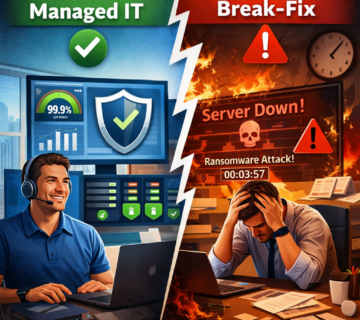
A fully-loaded cost comparison between in-house and managed IT is incomplete without factoring in the cost of downtime and security incidents under each model. An internal IT hire who is stretched across every function — help desk, security, backup, networking — is statistically more likely to miss a critical patch, overlook a misconfigured backup, or fail to catch an early sign of compromise simply due to volume of competing responsibilities. A managed provider with specialized teams across these functions, by contrast, is typically better positioned to catch these issues before they become expensive outages or security incidents. When modeling the in house IT vs managed IT cost comparison, it’s worth asking both options directly: what’s the historical average time to detect and resolve a critical issue, and what would an hour, a day, or a week of downtime actually cost your specific business in lost revenue and productivity?
This downside risk rarely shows up on a simple cost spreadsheet, but it’s often the largest financial variable in the entire decision. A business that has never experienced a serious outage may be tempted to discount this risk, but the businesses that have experienced one almost universally say the actual cost — in lost revenue, recovery time, and reputational damage — was higher than they expected going in.
How Growth Plans Should Factor Into the Decision
A model that works well for a 15-person company often breaks down at 40 people, and a model built for 40 can strain again past 100. Before locking into either an in-house build-out or a managed IT contract, map your growth plans for the next two to three years and ask how each model scales. Hiring internally means each growth stage potentially requires another hire, another round of training, and another ramp-up period. Managed IT providers generally scale more smoothly with headcount growth, since the provider is already staffed to handle a range of client sizes, though contract terms should be reviewed to confirm pricing scales predictably rather than requiring a renegotiation at awkward moments.
A Practical Framework for the Decision
Rather than comparing a single salary to a single invoice, work through this framework:
- List every IT function your business actually needs covered: help desk, network administration, security monitoring, backup management, vendor management, strategic planning, and compliance (if applicable).
- For the in-house option, estimate the fully-loaded cost (salary, benefits, tools, training) to cover all of those functions — not just one generalist hire.
- For the managed option, get an itemized quote confirming which of those functions are actually included in the base price versus billed separately.
- Factor in coverage gaps: what happens during vacation, illness, or turnover under each model?
- Factor in response time: what’s the realistic time to resolution for a critical outage under each model, in writing?
- Consider a hybrid or co-managed model if your business has specific institutional knowledge worth retaining in-house while still needing broader coverage.
What Doesn’t Show Up in Either Cost Model
Beyond the direct dollar comparison, there’s a less tangible factor worth naming: the opportunity cost of ownership. An internal IT hire who is managed closely and given clear priorities can move faster on business-specific projects than an external provider juggling multiple clients, simply because they have no competing priorities outside your business. A managed IT provider, meanwhile, often brings broader exposure to how similar-sized businesses in similar industries have solved comparable problems, which an internal hire typically lacks regardless of skill level. Neither advantage shows up cleanly on a cost spreadsheet, but both are worth weighing alongside the pure financial comparison, particularly for businesses where IT is closely tied to a specific competitive advantage rather than a purely operational function.
Questions to Ask Before Deciding
- What’s the fully-loaded annual cost of hiring and retaining an internal team capable of covering all required IT functions?
- What specific functions would a managed IT contract include, itemized rather than bundled into vague categories?
- What happens to IT support and security monitoring during an internal employee’s vacation or medical leave?
- How quickly can each option respond to a critical outage, in writing, not as a verbal estimate?
- Is a co-managed model available that blends internal staff with external support, and what would that cost structure look like?
For businesses leaning toward outsourcing some or all of this function, reviewing what a complete managed IT services engagement should include helps set a realistic baseline for comparison. For businesses wanting to keep internal staff while closing coverage gaps, a co-managed IT model is worth evaluating directly against the cost of expanding an internal team. Our related piece on preventing recurring business disruptions with managed IT in Orange County covers the operational risk side of this decision in more depth.
Frequently Asked Questions
What size business tends to benefit most from staying fully in-house?
Larger organizations with highly specialized, custom-built internal systems, a mature internal IT department already covering most functions well, and the budget to maintain redundancy across roles sometimes find that staying fully in-house makes sense. For most businesses below roughly 75 to 100 employees, however, the fully-loaded cost of replicating what a managed provider offers internally tends to exceed the cost of outsourcing, particularly once coverage gaps and specialization limits are factored in.
Is managed IT always cheaper than hiring internal staff?
Not always, but for most small and mid-sized businesses needing full coverage across help desk, security, networking, and backup, managed IT tends to come out ahead once the fully-loaded cost of an equivalent internal team is calculated. Larger businesses with highly specialized or unusual internal systems sometimes find a hybrid model more cost-effective than either extreme.
What’s a realistic per-user monthly cost for managed IT services?
Rates vary based on included scope — security tools, backup, and support hours all affect pricing. Get itemized quotes from multiple providers and compare what’s actually included in the base rate rather than comparing a single headline number.
Can I switch from in-house IT to managed IT without disrupting operations?
Yes, with proper planning. A structured transition typically involves documenting existing systems, migrating accounts and credentials, and running a short overlap period before fully cutting over, minimizing disruption during the switch.
Does a co-managed model cost more than either pure in-house or pure managed IT?
Not necessarily. A co-managed arrangement often costs less than building a full internal team while providing more coverage than a single internal hire alone, making it a practical middle option for many mid-sized businesses.
How should downtime risk factor into the cost comparison?
Estimate the realistic revenue and productivity cost of an hour, a day, and a week of critical system downtime for your specific business, then ask each option what its track record is for detecting and resolving critical issues before they escalate. This risk factor is often the largest hidden variable in the entire in-house versus managed IT decision, and it’s genuinely worth putting an actual, specific dollar figure on it rather than treating downtime as merely an abstract inconvenience.
Want an honest, numbers-based look at your own situation? Compare support models with a side-by-side cost breakdown specific to your business.
That comparison should walk through both the fully-loaded in-house cost and an itemized managed IT quote side by side, so you’re deciding based on your actual numbers rather than industry generalities.
The in house IT vs managed IT cost question rarely has a universal answer — it depends on how many functions your business genuinely needs covered and how realistically an internal hire or team can cover all of them. Running the full-cost comparison, rather than the salary-versus-invoice shortcut, is what actually reveals which model fits your business.